
BingX ChainSpot is a CeDeFi trading gateway that lets you buy and sell emerging Solana ecosystem crypto directly from your BingX Spot account using USDT, no Web3 wallet, seed phrases, bridges, or native gas tokens required. Instead of switching between exchanges, wallets, and DEXs, ChainSpot routes your orders to real on-chain DEX liquidity while keeping you inside the secure BingX interface. Gas fees are auto-calculated and deducted in USDT, and purchased tokens are credited back to your Spot wallet once the transaction settles.
In this beginner-friendly guide, you’ll learn how ChainSpot works, why it’s one of the easiest ways to access trending DeFi coins, and how to spot and trade emerging crypto gems step-by-step on both web and mobile.
What Is BingX ChainSpot?
BingX ChainSpot is a CeDeFi (Centralized + Decentralized Finance) feature that combines CEX-level security with seamless direct on-chain access. Instead of managing separate wallets or holding gas tokens, you trade DeFi tokens using your existing USDT balance while ChainSpot executes swaps across integrated DEXs in the background. This gives you the reach of DeFi with the simplicity and safety of a centralized exchange.
ChainSpot is designed for anyone who wants exposure to on-chain opportunities without the complexity of Web3. It’s ideal for beginners exploring DeFi tokens for the first time, CEX-first traders who want to add DEX-only assets to their portfolios, and airdrop or yield-hunters looking for fast entry into trending tokens with clear PnL tracking. It also suits security-focused users who prefer CEX-level custody, compliance, and account recovery while still accessing decentralized liquidity.
Key Features of ChainSpot on BingX
ChainSpot brings the convenience of a centralized exchange together with the reach of decentralized markets, allowing you to trade on-chain assets directly through your BingX Spot account. It removes the complexity of wallets, bridges, and gas-token management while still giving you access to real DEX liquidity and early-stage DeFi opportunities.
• Trade on-chain tokens using USDT from your Spot account, with no Web3 wallet, seed phrase, or native gas tokens required.
• Direct routing to DEX liquidity, giving you access to Solana tokens, DeFi assets, and emerging crypto gems not listed on traditional CEX spot markets.
• Automatic gas handling, with all network fees estimated and deducted in USDT.
• CEX-level security, including 2FA, cold storage, and full custody protection for your assets.
• Token insights built into the interface, showing project info, official links, and key on-chain indicators.
• Smart discovery tools, including rankings for top gainers, new listings, FDV, and holder growth.
• Flexible execution modes, enabling better control over pricing, slippage, and fill success.
• Clear portfolio tracking, including Average Cost Price, Unrealized PnL, and one-click trading actions.
These features make it easy to discover, analyze, and trade trending on-chain tokens, all without leaving BingX.
How to Find Trending On-Chain Tokens on ChainSpot
BingX maintains a “Trending On-Chain & DEX Coins” view, where you can see leading and trending tokens by market cap, volume, and other metrics in the ChainSpot zone. Inside this section, you can:
• Filter by Top Gainers, New Listings, FDV, or holder growth.
• Click into each token for on-chain analytics, project background, and official links.
• See which assets are newly available or gaining traction inside the ChainSpot universe.
This makes it easier to shortlist tokens for your strategy instead of manually scanning DEX explorers or multiple dashboards.
How Does BingX ChainSpot Work?
Behind the scenes, ChainSpot connects your BingX Spot account to on-chain DEX liquidity:
1. You choose a token and input a USDT amount.
2. ChainSpot estimates gas and slippage, then builds a smart contract transaction on the underlying network, such as Solana.
3. Your order is executed on integrated DEX pools, not on a conventional CEX order book.
4. Once confirmed, the purchased tokens are credited to your BingX Spot account. You can hold, sell, or withdraw them like any other asset.
You don’t maintain a separate seed phrase or manage native gas tokens. Gas fees are auto-calculated and deducted in USDT, so as long as your Spot balance is sufficient, trades can proceed.
How Is ChainSpot Different From Trading on BingX Spot Market?
ChainSpot and BingX Spot trading both let you buy and sell crypto using your BingX account, but they operate in different environments. BingX Spot uses a traditional CEX order book, offering deep liquidity, stable execution, and curated listings such as BTC, ETH, and major altcoins. Trades settle instantly within the exchange, no gas fees apply, and you benefit from predictable maker–taker pricing and familiar trading tools, making it ideal for users who prefer established markets and straightforward execution.
ChainSpot, on the other hand, routes your orders directly to on-chain DEX liquidity, giving you access to trending Solana tokens and early-stage DeFi assets that aren’t listed on centralized exchanges yet. You trade using your USDT balance, while ChainSpot manages smart-contract calls, gas estimation, and settlement in the background. It offers broader market reach and real-time access to emerging tokens, but also carries the added volatility, liquidity constraints, and smart-contract risks of the DeFi ecosystem.
How to Trade Trending On-Chain Tokens via ChainSpot on BingX Web
Follow these steps to trade trending on-chain tokens on the BingX website:
Step 1: Create and Fund Your BingX Account
Sign up or log in on BingX.com. Complete advanced verification (KYC Level 2) to unlock ChainSpot. Deposit USDT or convert other assets into USDT in your Spot account.
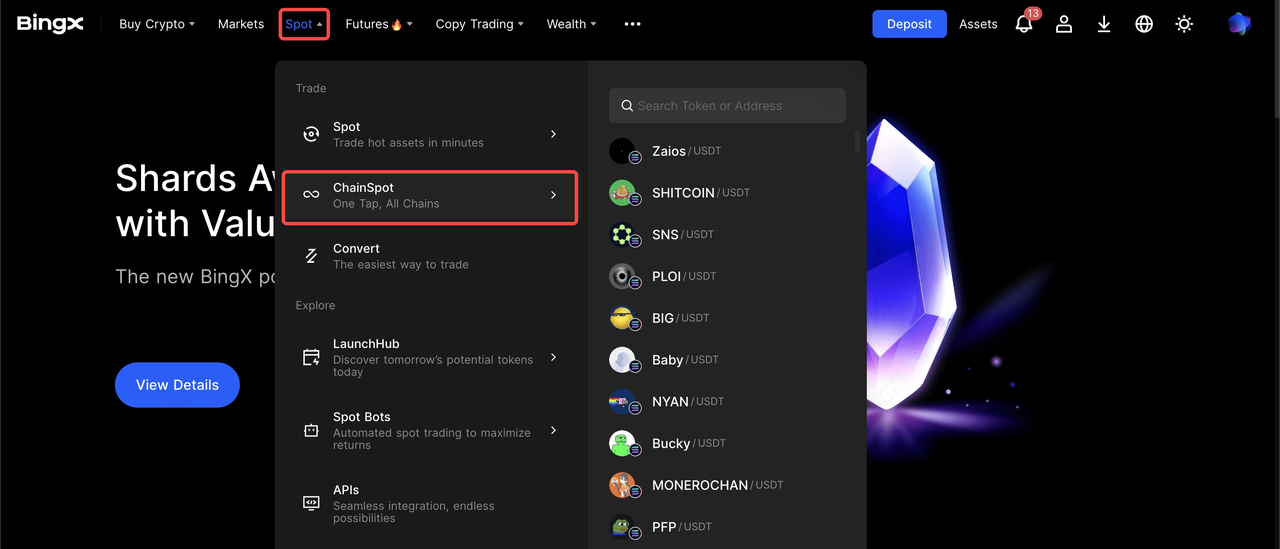
Step 2: Open the ChainSpot Interface
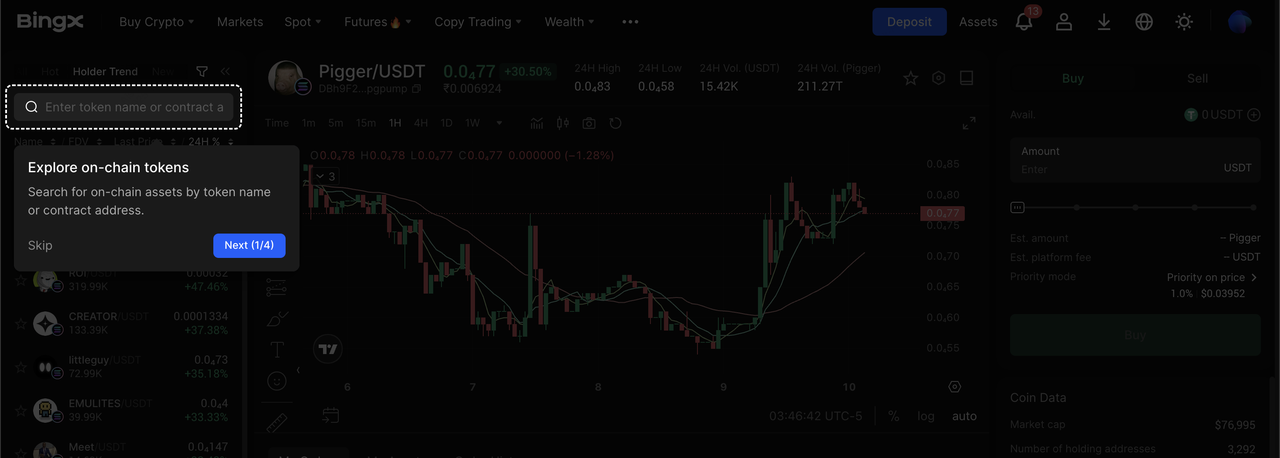
Go to Markets → Spot → ChainSpot. Browse Trending lists (Hot, Holder Trend, New, etc.) or search for a specific token by contract address for accuracy.
Step 3: Choose a Token and Review Insights
On the token page you can:
• Check price, volume, TVL, holders, and FDV where available.
• Read a project overview, official site, and social links.
• Review risk or security alerts before trading.
Step 4: Configure Your Order
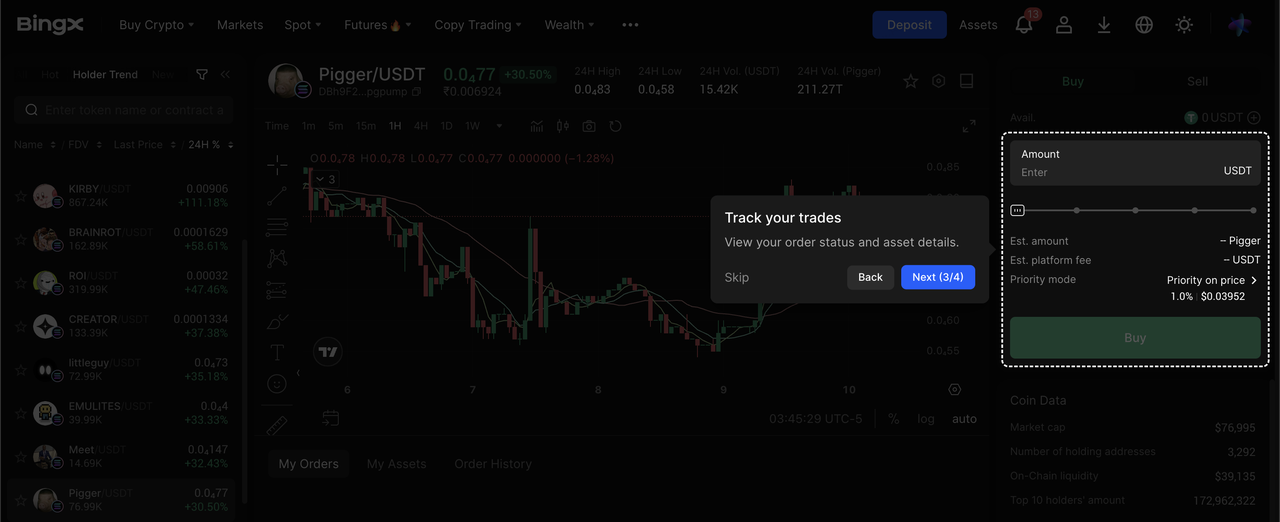
Enter the USDT amount you want to spend, a minimum of 10 USDT in ChainSpot 2.0. Select a trading mode:
• Price Priority – targets better pricing.
• Success Priority – targets higher fill success.
• Custom – tune execution with your own settings.
Choose slippage settings:
• Auto – AI-driven slippage based on current liquidity.
• Manual – set a percentage, e.g., 1–5%, if you want strict control.
You’ll see an estimated price and gas fee in USDT before confirming.
Step 5: Confirm and Track the Trade
Click Buy and confirm. On-chain confirmation usually takes seconds, depending on network conditions.
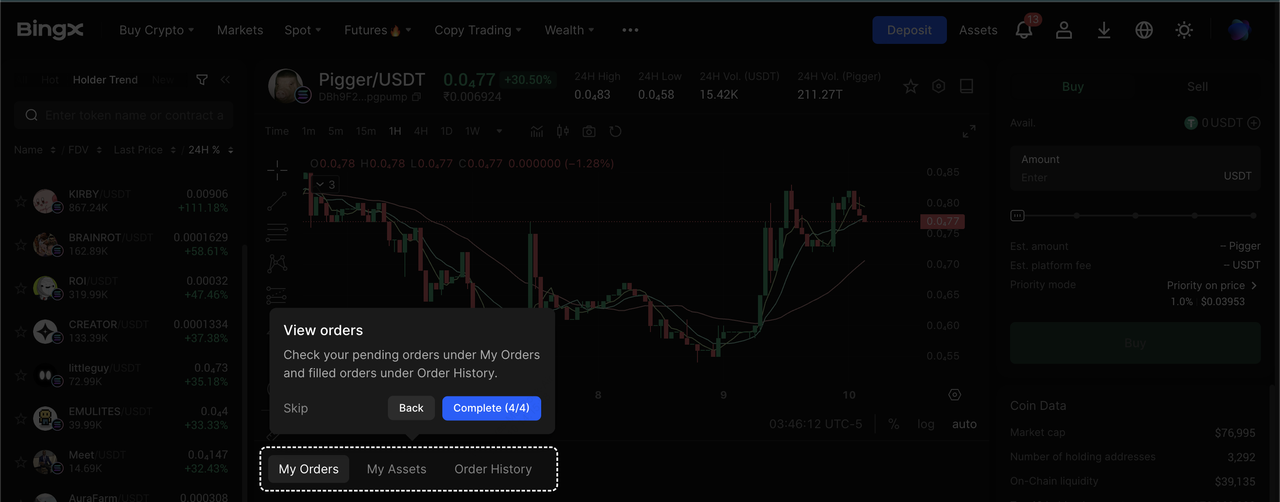
Track your order under My Orders / Order History within ChainSpot. Once finalized, the tokens appear in your Spot account, with Average Cost Price and Unrealized PnL visible for easier monitoring.
To exit, simply Sell the token in ChainSpot and convert back to USDT with the same steps.
How to Trade Trending On-Chain Tokens via ChainSpot on BingX App
You can also trade trending tokens inside the BingX app:
Step 1: Update Your App
Make sure you’re using BingX v4.58+ or later to access ChainSpot and newer features.
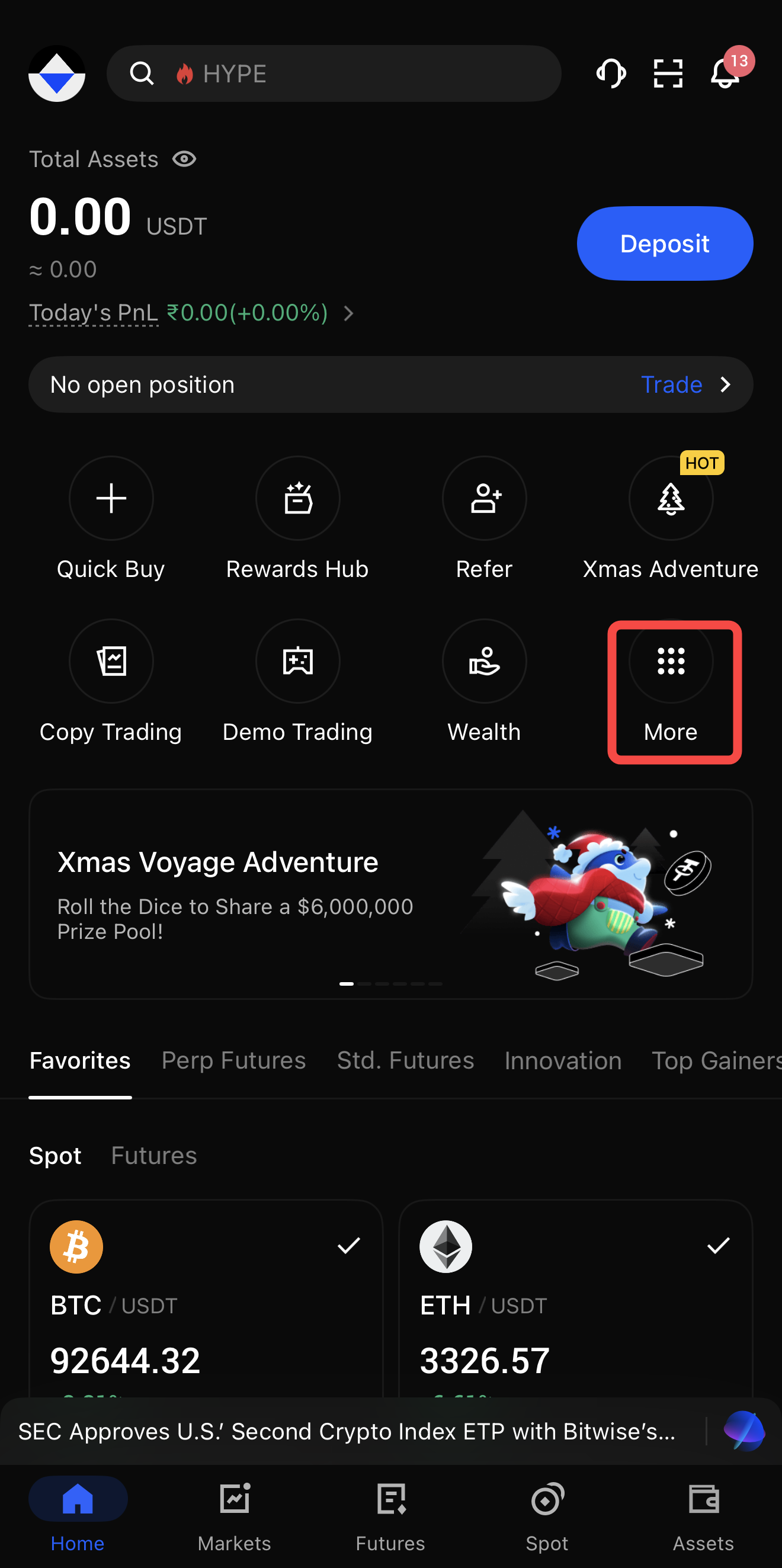
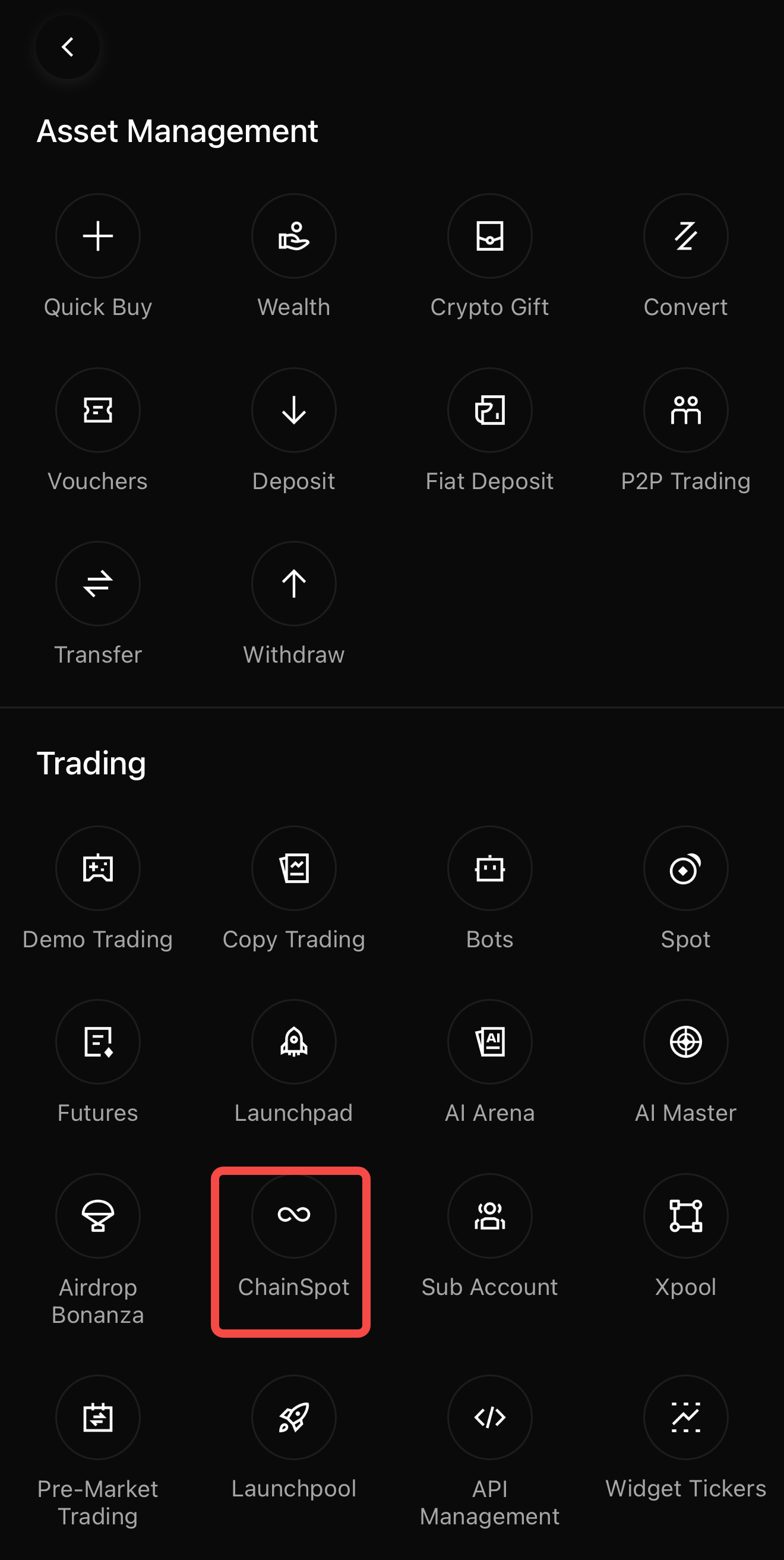
Step 2: Access ChainSpot
Open the app and look for ChainSpot via:
• The home screen feature carousel,
• The Spot section, or
• The More / Products menu, depending on layout.
Step 3: Explore Trending Tokens
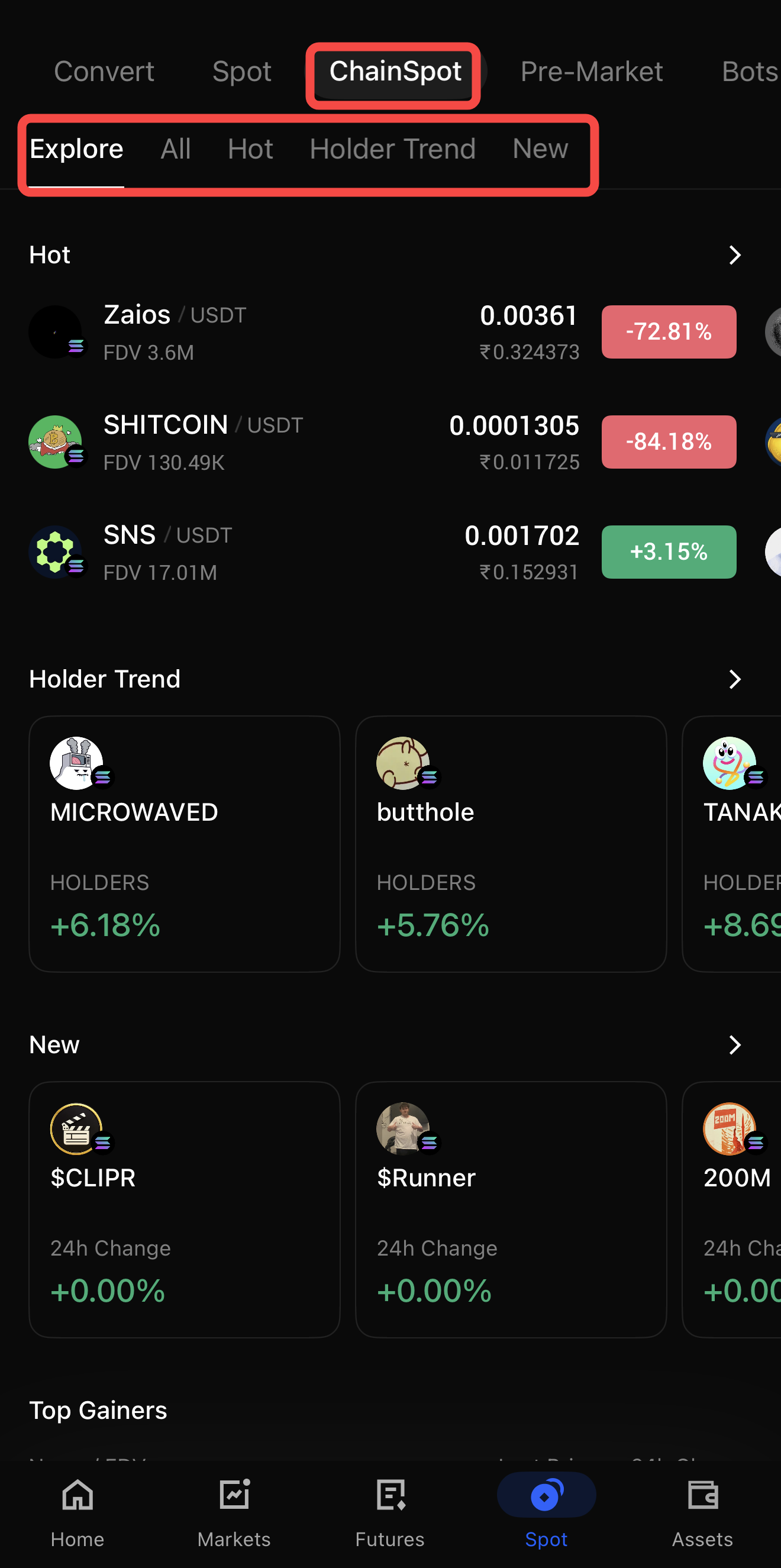
Tap into the Trending / ChainSpot zone to see:
• Top gaining tokens
• Newly added on-chain coins
• Other rankings surfaced via AI-assisted discovery.
Step 4: Place a Trade
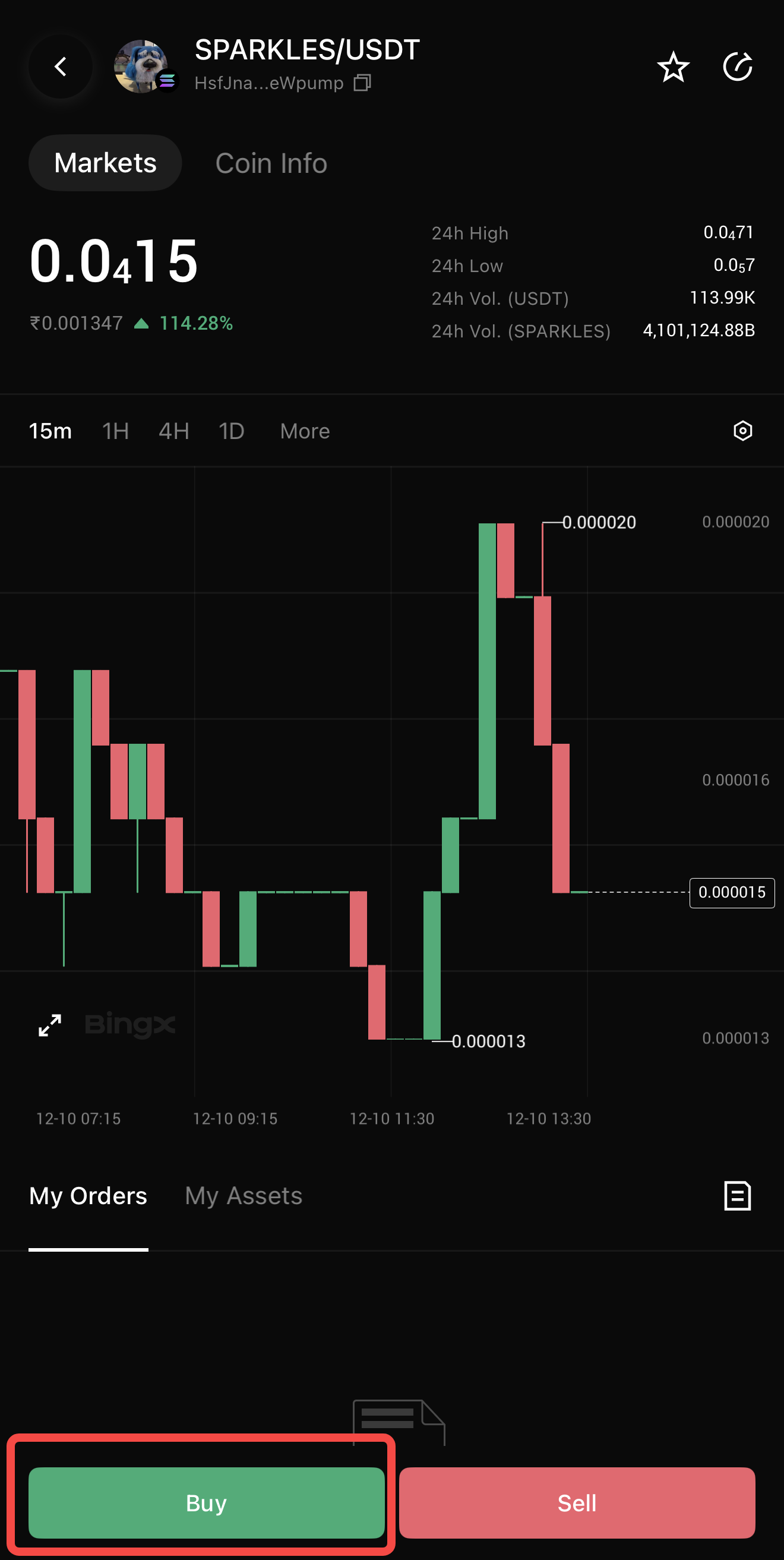
Select a token, review insights and risk reminders. Input your USDT amount, pick an execution mode, and leave slippage on Auto unless you have a specific tolerance in mind.
Confirm the order and wait for on-chain settlement, then view updated balances and PnL in your Spot portfolio and ChainSpot interface.
Pro Tips to Trade Trending On-Chain Tokens Smarter with ChainSpot
1. Start Small on New Tokens: Use low amounts, starting from 10 USDT when you first test a new DeFi token or pool.
2. Use Auto Slippage First: Let ChainSpot’s AI-assisted slippage mode handle slippage until you understand how a specific pool behaves.
3. Watch TVL and Volume: Prioritize tokens with higher TVL and 24h volume to reduce slippage and failed orders.
4. Monitor PnL and Average Cost: Use ChainSpot’s Average Cost Price and Unrealized PnL metrics to decide when to scale in or out instead of reacting purely to price spikes.
5. Stay Updated on New Chains and Features: ChainSpot is designed to be multi-chain and feature-rich over time. Check official announcements for new networks, execution modes, and reward campaigns.
Key Considerations Before Trading on ChainSpot
Trading on-chain via ChainSpot is simpler than doing it manually, but risks still exist:
• Slippage and Liquidity: On thin liquidity pools, prices can move quickly. If slippage is set too low, orders may fail. If set too high, you might accept bigger price impacts.
• Smart Contract and DeFi Risk: Tokens are still DeFi projects, often early-stage and experimental. Smart-contract bugs, admin key risk, or governance changes can affect token safety.
• On-Chain Volatility: Trending tokens can move faster than large-cap CEX coins. Consider starting with small sizes and avoid over-allocating to illiquid pools.
• Delist / Migration Risk: In some cases, ChainSpot may delist an on-chain token, for example, before migrating it to full Spot listing. Check announcements for migration schedules and rules.
Risk Reminder: On-chain trading is not risk-free. Always do your own research (DYOR), use amounts you can afford to lose, and diversify across assets instead of chasing a single trending token.
Final Thoughts
BingX ChainSpot turns on-chain trading from a multi-step, wallet-heavy process into a one-tap experience that lives inside your existing BingX Spot account. You can discover trending on-chain tokens, analyze key metrics, and execute trades on DEX liquidity, all while benefiting from BingX’s security, custody, and support.
Use small amounts at first, lean on Auto slippage and token insights, and gradually build your own framework for evaluating trending DeFi tokens. Even with ChainSpot’s convenience, volatility and smart-contract risk remain, so trade responsibly.
Related Reading
FAQs on BingX ChainSpot
1. What is BingX ChainSpot?
BingX ChainSpot is a CeDeFi trading feature that lets you trade on-chain tokens directly from your BingX Spot account using USDT. It routes orders to DEX liquidity under the hood, so you get DeFi access with CEX security and UX.
2. Do I need a Web3 wallet or native gas tokens to use ChainSpot?
No. You don’t need a separate wallet or native gas tokens like SOL. ChainSpot automatically estimates and deducts gas fees in USDT from your Spot account.
3. Which tokens can I trade on ChainSpot?
You can trade a curated list of on-chain and DEX-listed tokens, starting with Solana ecosystem assets and expanding over time. The Trending On-Chain & DEX Coins page helps you find top movers and new listings.
4. Why did my ChainSpot order fail?
Orders may fail if liquidity is too low, price moves beyond your slippage tolerance, or maintenance / contract updates are in progress. Increasing slippage slightly or reducing order size often improves success rates.
5. What fees apply when trading via ChainSpot?
During certain phases like the beta/launch period, platform fees may be set to 0, but on-chain gas fees still apply and are deducted in USDT. Check the latest fee details and promotions inside the app or Help Center.
6. Is ChainSpot safe?
ChainSpot uses BingX’s infrastructure, including 2FA, cold storage, and compliance controls. However, DeFi and on-chain tokens carry inherent market and smart-contract risks. Always research projects, start small, and diversify.
7. How do I access ChainSpot?
You can access ChainSpot on both the web and mobile app. On the web, go to Markets → Spot → ChainSpot / On-Chain & DEX, while on the app (version 4.58 or higher), simply tap the ChainSpot entry from the homepage, Spot tab, or product menu.