
Navigating the high-velocity 2026 spot market requires more than just a 'buy low, sell high' mentality; it requires a surgical understanding of risk management. On BingX, Take-Profit (TP) and Stop-Loss (SL) orders are the professional guardrails that ensure your trading plan is executed with mathematical discipline. Unlike the futures market, where TP/SL is often used to prevent liquidation, spot traders utilize these tools to protect their physical asset value and lock in realized growth.
As a leading global exchange, BingX's spot market utilizes a sophisticated algorithmic order system designed to suit both institutional-grade portfolio managers and retail beginners. By mastering the relationship between trigger prices and execution paths, you can trade with higher confidence, knowing that your exit strategy is anchored to your specific risk tolerance rather than emotional impulses during market volatility.
This guide breaks down exactly what take-profit and stop-loss (TP/SL) orders are, how they function on BingX spot market, and why they are the most critical safety net for your long-term wealth preservation.
What Are Take-Profit and Stop-Loss (TP/SL) Orders?
Take-Profit and Stop-Loss are conditional orders used to automate the closing of a position. They act as Limit Closing Orders or Market Closing Orders that only become active when the market reaches a specific threshold.
- Take-Profit (TP): An order designed to close a profitable position once a target price is hit. It ensures you lock in gains before a potential market reversal.
- Stop-Loss (SL): An order designed to limit potential losses. If the asset's value drops to your stop price, the system automatically sells the asset to prevent further drawdown of your capital.
In practice, the TP/SL function serves as the administrative backbone of your trading framework. By anchoring your exits to predetermined levels, you eliminate the silent profit killers of indecision and greed. Whether the market spikes during a global news event or crashes while you are offline, BingX ensures your portfolio reacts according to your plan.
How TP/SL Works on the BingX Spot Market
On BingX, TP/SL orders are engineered for flexibility and transparency, offering two primary ways to protect your assets: Standalone TP/SL and Pre-set TP/SL. Here is the breakdown of their mechanics:
- Asset Occupancy: When you place a standalone TP/SL order in the spot market, the required assets are immediately occupied or locked by the system. This ensures that the assets are available for sale the moment the trigger is hit.
- Trigger Logic: The system monitors the Last Price on the BingX order book. When this price touches your Trigger Price, the order is released.
- Execution Paths: Once triggered, you can choose between two execution methods:
- Market TP/SL: Fills immediately at the best available market price and guarantees execution.
- Limit TP/SL: Places a limit order at a specific price, which guarantees price, but not execution.
- Price Limit Protection: To prevent erroneous trades, BingX enforces a price limit of typically 3% between the trigger and order price for Limit TP/SL. This ensures your order remains within the fair value range of the market.
Take-Profit and Stop-Loss (TP/SL) vs. OCO Orders: Key Differences
While a basic TP/SL order protects one side of a trade, BingX also offers One-Cancels-the-Other (OCO) functionality. This allows you to set a Take-Profit and a Stop-Loss simultaneously for the same asset.
|
Feature |
Standalone TP/SL |
OCO Order |
|
Primary Goal |
Single-direction protection |
Dual-direction management (TP + SL) |
|
Asset Occupancy |
Full amount occupied |
Single-side occupancy, locks only what is needed |
|
Logic |
Executes when triggered |
Execution of one automatically cancels the other |
|
Best Scenario |
Managing a specific risk |
Comprehensive 'Set and Forget' strategy |
In practical terms, the OCO is your shield against two-way volatility. If your Take-Profit is hit, the Stop-Loss is instantly deleted, preventing ghost orders from staying in the book and potentially selling your assets later if the price retraces.
How to Set Take-Profit and Stop-Loss Orders on BingX Spot: Step-by-Step Guide
On BingX, you can choose to set your exits either while you are placing your initial buy order (Pre-set) or after you already own the asset.
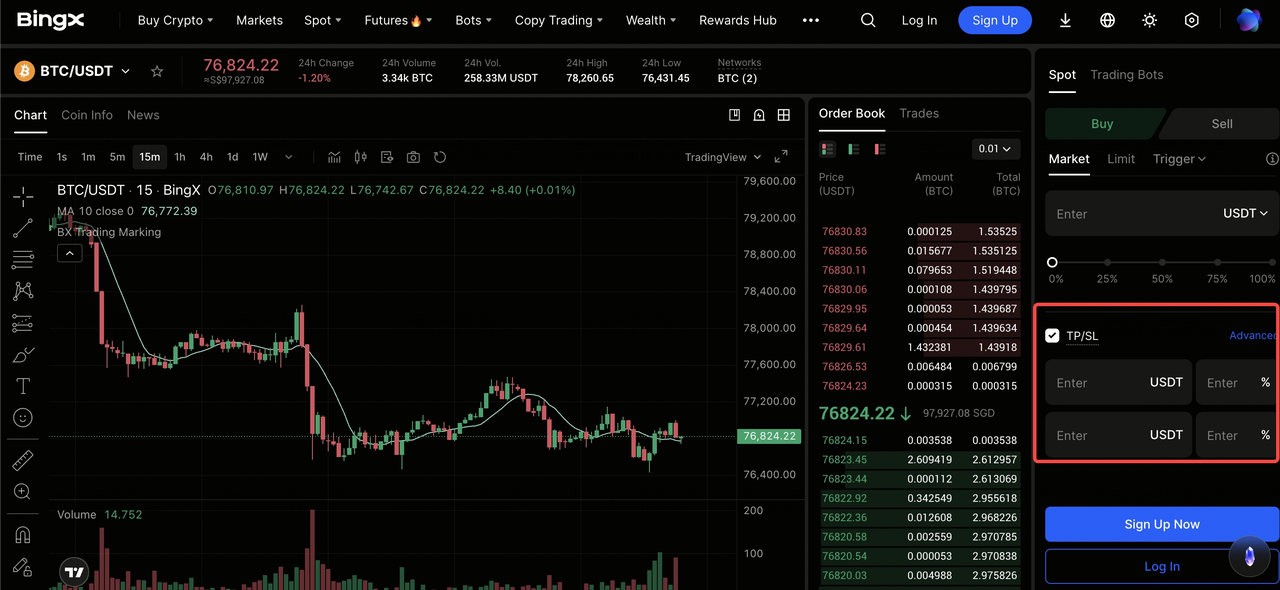
How to set TP/SL orders on BingX spot market
Method 1: Pre-setting TP/SL on a Limit Order
- Navigate to Spot: Open the trading pair. e.g., BTC/USDT.
- Select Limit Order: Enter your entry price and quantity.
- Check TP/SL Box: Click the TP/SL checkbox in the order form.
- Input Targets: Set your desired Take-Profit and Stop-Loss prices.
- Confirm: Click Buy. Your exits will activate automatically once your buy order is filled.
Method 2: Setting Standalone TP/SL for Held Assets
- Open Order Zone: Select the TP/SL tab next to the Market/Limit options.
- Set Trigger: Enter the price that should activate the sale.
- Choose Execution: Select Market (recommended for Stop-Loss) or Limit.
- Amount: Use the slider to select how much of your holding to protect.
- Execute: Click Sell. Your order will move to the Open Orders tab until triggered.
Common Misconceptions: Why TP/SL Is Vital Without Liquidation
A common mistake among spot beginners is believing that TP/SL is only for high-leverage futures trading. In reality, spot TP/SL is a tool for Efficiency and Opportunity Cost Management:
Misconception 1: "I don't need a Stop-Loss because I can't be liquidated."
While spot trading removes the risk of a zero-balance liquidation, it introduces the risk of opportunity cost and structural drawdown. Holding a bag that has dropped 50% requires a 100% gain just to break even, a mathematical hurdle that can trap capital for years.
For example, if you set a Stop-Loss at 10% during a trend reversal, you preserve 90% of your purchasing power, allowing you to redeploy that capital into a higher-alpha asset or rebuy the same asset at a lower entry point. Practically, a Stop-Loss is not a sign of a failed trade; it is a mechanism to ensure your liquid capital isn't converted into a frozen long-term holding by market force.
Misconception 2: "TP/SL always fills at my exact price."
Traders often confuse the Trigger Price with the Execution Price, leading to gapped orders during high-volatility events like flash crashes. In a market where the price drops from $100 to $90 in milliseconds, a Limit Stop-Loss set at $95 may never find a matching buyer if the order book is thin at that specific level.
Data shows that during extreme volatility, slippage is inevitable; therefore, professional traders prioritize Market Stop-Loss for emergency exits. This ensures the matching engine fills the order at the best available bid immediately, sacrificing a few pips of price to prevent a catastrophic 20–30% unhedged slide.
Misconception 3: "Setting a TP/SL makes me a short-term trader."
Automating exits is a hallmark of portfolio rebalancing, not just day trading. Long-term HODLers use Take-Profit levels to combat the Greed Index by systematically converting portions of their position into stablecoins during parabolic moves, e.g., selling 25% at a 3x gain. This creates a Risk-Free core position by recouping the initial investment.
For instance, setting a Take-Profit at a historical resistance level ensures you capture value at the local peak before a natural 20–40% market retracement. This is a practical, long-term wealth preservation strategy that prevents paper gains from evaporating during the cyclical downturns of the 2026 market.
Final Thoughts: Why Use TP/SL Orders When Trading Spot on BingX
Incorporating Take-Profit and Stop-Loss orders into your spot trading routine is the most effective way to transition from reactive speculation to systematic wealth management. On BingX, these tools function as automated execution protocols that bypass the psychological hesitation often felt during rapid market shifts. By pre-defining your exit logic, whether it’s securing a 20% gain at a key resistance level or capping a drawdown at 5%, you ensure that your portfolio remains liquid and ready to capitalize on the next opportunity. Practically, this removes the need for constant price monitoring and allows the exchange's matching engine to enforce your risk-to-reward ratio with mathematical precision.
Ultimately, a reusable trading framework is built on the foundation of capital preservation rather than chasing every market peak. Utilizing OCO orders allows you to manage both sides of a trade simultaneously, ensuring that your stop-loss is never left active after a profit target is reached.
Risk Reminder: While TP/SL orders are powerful risk-mitigation tools, they are not a guarantee against all losses. In extreme market conditions or periods of low liquidity, gapping can occur, causing orders to fill at a different price than intended or fail to execute entirely. Always verify your order parameters and use the BingX Demo Account to refine your automation strategy before deploying significant capital.
Related Reading
- How to Use Order Book Depth and Market Data for Bitcoin Trading
- Best 10 Crypto Spot Trading Platforms for Beginners in 2026
- How to Buy and Sell Crypto on the BingX App: A Step-by-Step Guide (2026)
- What Is Trading Psychology: How to Control Emotions and Trade Rationally
- What Is Slippage in Crypto and How Does BingX Guarantee Exact Prices?
FAQs on TP/SL Orders in Spot Trading
1. Does a TP/SL order freeze my assets?
Yes. In standalone Spot TP/SL, your assets are occupied immediately upon placing the order to ensure they are available when the trigger is hit.
2. Why was my Stop-Loss triggered but my assets weren't sold?
This typically happens with Limit Stop-Loss orders during high volatility. If the market price gaps below your order price before a match is found, the order remains in the book. For a guaranteed exit, use Market Stop-Loss.
3. Can I set a Stop-Loss higher than the current price?
No. A Stop-Loss (Sell) trigger must be lower than the current market price. If you want to sell when the price rises, you must use a Take-Profit or a Limit Sell order.
4. What is the difference between TP/SL and a Conditional Order?
The main difference is Asset Occupancy. A TP/SL order locks your assets immediately. A Conditional Order does not lock assets until the trigger price is reached, allowing for more flexible capital use.
