The BingX Card is a premium Visa debit card that integrates digital assets into everyday commerce. Driven by the mission to “Bring Crypto to Everyday Life,” it serves as a bridge between the digital economy and real-world retail, making crypto spendable on everything from a morning coffee to travel bookings.
Powered by Wirex, a globally regulated payment infrastructure provider, the card pulls funds dynamically from the BingX Funding Account. Following its September 2026 update, the BingX Card is available to all eligible users in supported regions, with revised cashback benefits for both the Virtual Card and physical Metal Card. This guide explains how to apply, fund the card, make payments, and use the updated rewards program.
Key Takeaways About the BingX Card
- Uses USDT directly from the Funding Account: The BingX Card does not require a separate card balance and draws from available USDT in the BingX Funding Account.
- Visa, Apple Pay, and Google Pay support: The card operates on the Visa network and can be used at millions of eligible online and offline merchants, , with support for Apple Pay and Google Pay.
- Virtual and Metal Card options: Eligible users can apply for a free Virtual Card or a physical Metal Card. A $180 application fee applies to non-VIP and non-agent users applying for the Metal Card.
- Up to 5% monthly cashback: Cashback ranges from 2% to 3% for the Virtual Card and from 3% to 5% for the Metal Card. Tiers increase automatically as cumulative monthly spending reaches the next threshold and are not linked to VIP status.
- 20% cashback on eligible subscriptions: Qualifying everyday subscriptions can earn 20% cashback, subject to merchant classification and the monthly cashback limit for the current card tier.
- KYC and regional eligibility apply: Card availability depends on identity verification, regional eligibility, and the latest BingX Card terms.
What Is the BingX Card?
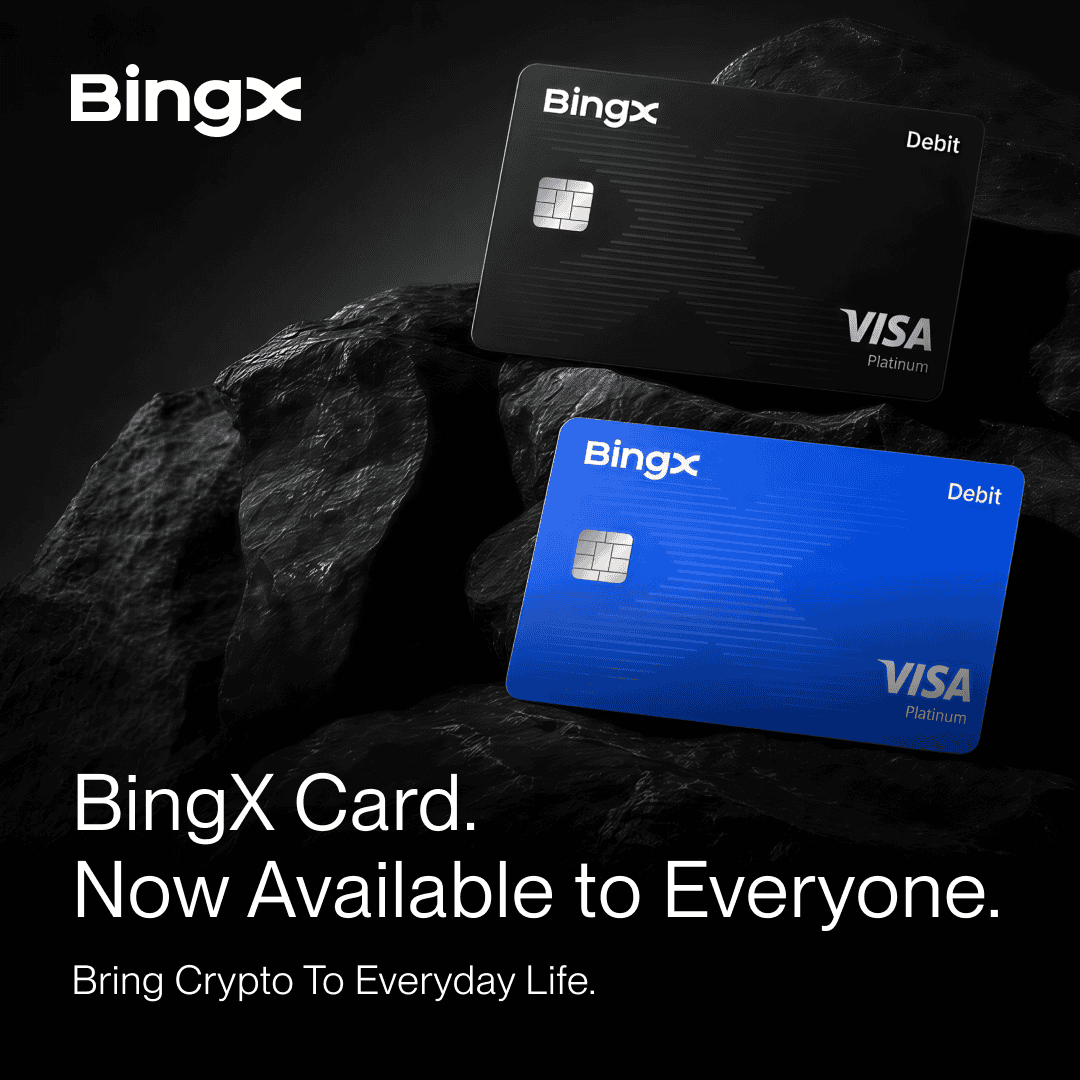
The BingX Card is a crypto-backed Visa debit card designed to connect crypto trading and account balances with real-world purchasing power. Rather than requiring users to manually convert crypto to fiat and withdraw it to a bank, the card converts available USDT from the BingX Funding Account when an eligible payment is processed. The card is available in virtual and physical formats. Both use a monthly tier system, but the Metal Card offers higher cashback rates and ATM access.
|
Feature |
Virtual Card |
Metal Card (Physical) |
|
Application fee |
Free |
$180 for non-VIP and non-agent users |
|
Annual fee |
Free |
Free |
|
Shipping |
Free |
Free |
|
Monthly cashback rate |
2% to 3% |
3% to 5% |
|
Maximum monthly cashback |
Up to $100 in USDT |
Up to $150 in USDT |
|
Eligible subscription cashback |
20%, subject to the current tier’s monthly limit |
20%, subject to the current tier’s monthly limit |
|
ATM access |
Not supported |
Supported |
Why Apply for a BingX Card: 5 Key Benefits
The BingX Card bridges the gap between digital assets and everyday spending while offering different benefits for virtual and physical card users.
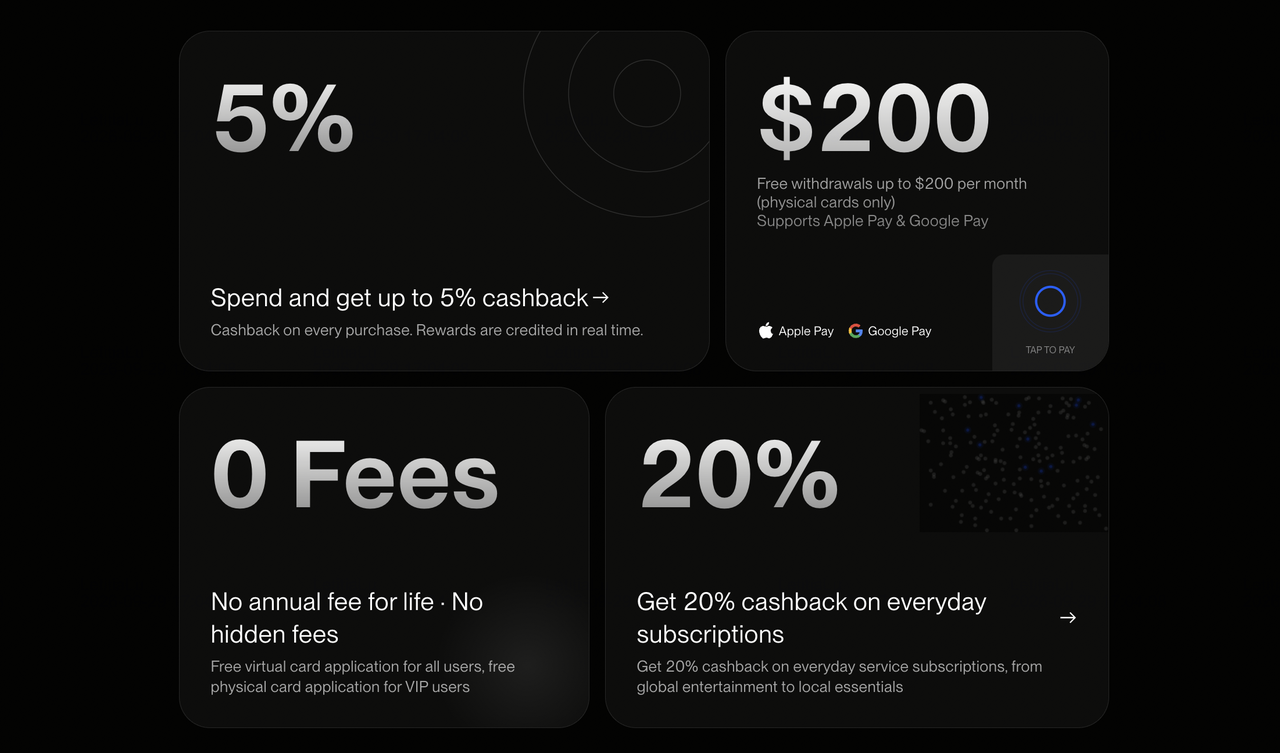
- Broader access: The updated BingX Card program is open to all eligible users rather than being limited to VIP and selected partner groups. Regional availability and identity verification requirements still apply.
- Spend-based cashback rewards: Virtual Card users can earn from 2% to 3% cashback, while Metal Card users can earn from 3% to 5%. The card tier can upgrade automatically as cumulative spending reaches the next monthly threshold and operates separately from BingX VIP status.
- 20% cashback on eligible subscriptions: Qualifying purchases from services such as ChatGPT, Claude, Netflix, Spotify, Telegram, X, and TradingView can receive 20% cashback when the transaction falls under an eligible merchant category code.
- No recurring maintenance costs: Both card formats have no annual fee, and the program does not charge account inactivity or card closure fees. Metal Card shipping is also free.
- Global cash access: The physical Metal Card allows users to withdraw local currency from compatible ATMs wherever the card and Visa network are supported.
How to Apply for a BingX Card?
The September 2026 program update expands access to all eligible BingX users in supported regions. A VIP tier or partner invitation is no longer a general requirement for applying, although users must still complete the required identity and regional eligibility checks.
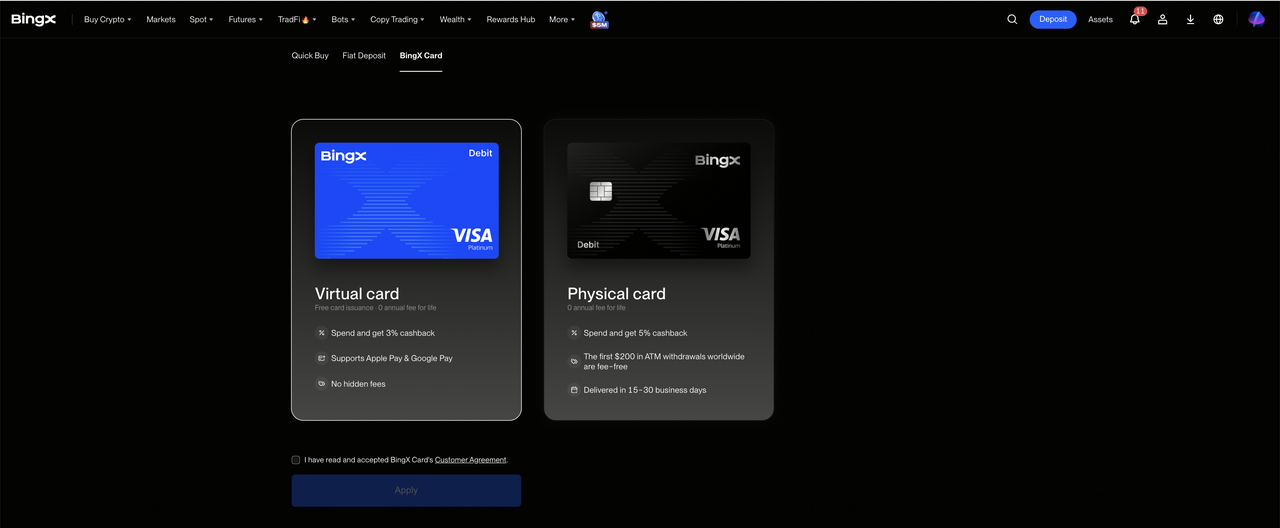
Step 1: Open the BingX Card application page. Go to the BingX app or website and open the BingX Card application page.
Step 2: Complete the eligibility and identity checks. Review the eligibility notice and complete identity verification if required. The submitted identity information must meet the rules for the user’s country or region.
Step 3: Choose the card type. Select either the free Virtual Card or the physical Metal Card.
Step 4: Review the terms and applicable fee. Check the application terms and any displayed charge. Non-VIP and non-agent users pay a $180 application fee for the Metal Card.
Step 5: Confirm the application. Virtual Card details become available after approval, while approved Metal Cards are shipped to the eligible address provided during the application.
Card access, fees, and approval remain subject to the latest terms displayed on BingX at the time of application.
How Do You Activate and Set Up Your BingX Card?
Before you can begin spending your crypto assets, you must complete a brief initialization process to activate your card features and secure your payment credentials.
1. How to Activate a Virtual BingX Card
Virtual cards are issued digitally after an application is approved.
Step 1: Open the Virtual Card. Open the BingX app, go to Card Management, and select the Virtual Card from the available card options.
Step 2: Reveal the card details. Select Reveal Details to view the 16-digit Visa card number, expiration date, and CVV. These details can be used for eligible online payments.
Step 3: Add the card to a digital wallet. Select Add to Wallet to link the Virtual Card to Apple Pay or Google Pay for supported contactless and mobile payments.
2. How to Activate a Physical BingX Metal Card
Once the physical card arrives, it needs to be activated before it can be used for purchases or ATM withdrawals.
Step 1: Open the physical card profile. Log in to the BingX app, go to the card profile, and select Activate Physical Card.
Step 2: Enter the required security details. Follow the in-app prompts and enter the security information shown on the physical card to verify the card.
Step 3: Set the ATM PIN. Create a secure four-digit ATM PIN in the app to complete the activation and prepare the card for supported ATM withdrawals and in-person payments.
How Do You Use the BingX Card?
The BingX Card handles conversion and settlement during a payment, so a separate manual fiat conversion is generally not required before each purchase.
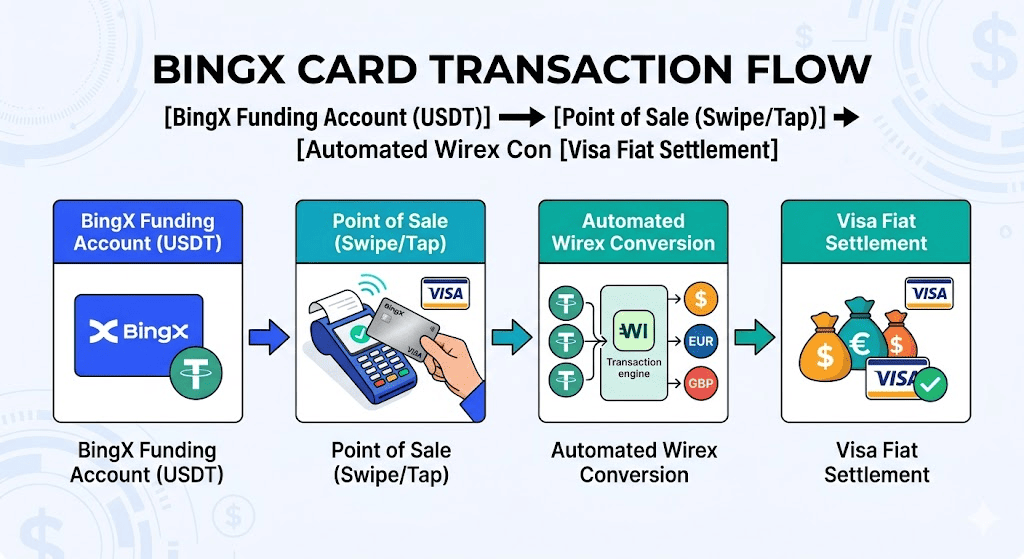
Step 1: Fund Your Account
The card does not maintain a separate fiat balance. Its available spending capacity depends on the USDT held in the BingX Funding Account. Users can add funds by:
- Deposit USDT from an external wallet.
- Using BingX Quick Buy or P2P Trading and transferring the resulting USDT to the Funding Account.
Step 2: Make Purchases with Your BingX Card
The card can be used at eligible merchants that accept Visa.
- Online purchases: Enter the card number, expiration date, and CVV at checkout.
- In-store payments: Tap the physical Metal Card or use a supported digital wallet such as Apple Pay or Google Pay.
Step 3: Make Cash Withdrawals with the Metal Card
Insert the physical Metal Card into a compatible Visa ATM, enter the four-digit PIN, and choose the withdrawal amount. The stated ATM limit is up to $500 per day and a maximum of five withdrawal transactions per day.
Step 4: Track and Claim Cashback
Cashback from an eligible transaction becomes visible in the cashback rewards area after the purchase. Once transaction settlement is complete, normally after approximately three calendar days, the reward can be claimed manually to the BingX Funding Account. Cashback is distributed in USDT. The minimum withdrawal amount is 2 USDT, and an individual transaction must generate at least $0.01 in cashback to meet the stated reward threshold.
Understanding BingX Card Cashback, Fees, Spending Limits, and Transaction Thresholds
The BingX Card uses spending-based cashback tiers, monthly spending limits, and transaction fees that vary by card type and transaction. The key terms are summarized below.
1. Monthly Cashback Tiers
New users start at Tier 1. Cashback tiers can increase automatically during the month as cumulative eligible spending reaches the next threshold, and the card tier is separate from BingX VIP status.
At 09:00 on the first day of each month in UTC+8, the starting tier is set based on the previous month's eligible spending. Users can still move to a higher tier during the month by reaching the required spending level.
Virtual Card Cashback Tiers
|
Tier |
Qualifying monthly spend |
Cashback rate |
Cashback limit |
|
Tier 1 |
Below $200 |
2% |
Less than $4 before Tier 2 |
|
Tier 2 |
$200 to below $1,000 |
2.50% |
Less than $25 before Tier 3 |
|
Tier 3 |
$1,000 or more |
3% |
$100 monthly cap |
Metal Card Cashback Tiers
|
Tier |
Qualifying monthly spend |
Cashback rate |
Cashback limit |
|
Tier 1 |
Below $500 |
3% |
Less than $15 before Tier 2 |
|
Tier 2 |
$500 to below $2,000 |
4% |
Less than $80 before Tier 3 |
|
Tier 3 |
$2,000 or more |
5% |
$150 monthly cap |
The Tier 1 and Tier 2 figures show the cashback earned before the next spending threshold is reached. The explicit monthly caps apply at Tier 3.
2. 20% Cashback on Eligible Subscriptions
Eligible subscription payments can earn 20% cashback, including services such as ChatGPT, Claude, X, Netflix, Spotify, Telegram, and TradingView. Total subscription cashback still counts toward the monthly limit for the current card tier.
Eligibility depends on the merchant category code used for the transaction. Listed qualifying MCCs include 5817, 5734, 4899, and 5815, so the merchant name alone does not guarantee the promotional rate.
3. Spending Limits
Users can spend up to $10,000 in a single transaction or within a single day. The stated monthly spending limit is $30,000, providing a flexible ceiling for regular card purchases.
4. Transaction and Service Fees
Retail purchases are subject to the fees shown in the current BingX Card terms when USDT is converted from the Funding Account to settle the transaction. Additional foreign-exchange costs may apply to non-USD purchases.
For Metal Card ATM withdrawals, the first $200 per month is free. Amounts above $200 are charged a 2% service fee. There are no stated annual maintenance, inactivity, or card-closure fees.
Supported Countries and Regional Restrictions for Using BingX Card
Card issuance is determined by compliance parameters set by Wirex and regional financial authorities. Because regulatory policies can change, the list of supported countries and regions may be adjusted over time. Users should check the BingX Card application page or contact customer support for the latest availability.
- Europe (EEA): Andorra, Belgium, Bulgaria, Croatia, Cyprus, Denmark, Estonia, Finland, Gibraltar, Greece, Hungary, Iceland, Ireland, Latvia, Lithuania, Luxembourg, Malta, Monaco, Montenegro, Norway, Portugal, Slovakia, Slovenia, Sweden, and Switzerland.
- Asia Pacific (APAC): Taiwan, Australia, New Zealand, the Philippines, Thailand, Vietnam, South Korea, Japan, and Malaysia.
- Latin America (LATAM): Argentina, Brazil, Chile, Colombia, Ecuador, Mexico, and Peru.
- Other Regions (ROW): Israel, Saudi Arabia, the United Arab Emirates, Bahrain, Oman, Kazakhstan, Ukraine, Turkey, South Africa, Kenya, Nigeria, Ghana, Uganda, Azerbaijan, Georgia, the Marshall Islands, El Salvador, Guernsey, the Isle of Man, Jersey, Moldova, Panama, and Uzbekistan.
5 Key Factors to Consider When Using Your BingX Card
The BingX Card makes crypto-funded spending more convenient, but a few operating rules are worth understanding before using it.
- USDT Funding Account balance: The card uses available USDT in the BingX Funding Account. Funds held in other BingX accounts may need to be transferred before spending.
- Conversion and FX costs: Transactions may involve crypto conversion and additional foreign exchange charges, especially for non-USD purchases. Check the latest fee schedule before spending.
- ATM withdrawal fees: The first $200 of monthly Metal Card ATM withdrawals is free. Withdrawals above that amount are charged a 2% service fee.
- Regional eligibility: BingX Card access is limited to verified users in supported regions and remains subject to local requirements.
- Monthly cashback tiers: The starting tier each month is based on the previous month's eligible spending and can increase as spending rises. Rewards are paid in USDT and remain subject to the monthly limit for the current tier.
Final Thoughts: Should You Get a BingX Card?
The BingX Card expands the practical use of digital assets by connecting USDT in a BingX Funding Account with the global Visa payment network. The September 2026 update makes the card more accessible to eligible users and introduces a clearer spend-based reward structure. Virtual Card users can earn up to 3% cashback, Metal Card users can earn up to 5%, and eligible everyday subscriptions can receive 20% cashback within the applicable monthly reward limit.
The card may suit users who already hold USDT on BingX and want a direct way to make online, in-store, or, with the Metal Card, ATM transactions. However, applicants should compare the $180 Metal Card fee for non-VIP and non-agent users with their expected usage, confirm current fees and regional eligibility, and understand that cashback depends on spending tiers, merchant classification, and transaction settlement. Digital asset prices and conversion costs can also affect the value available for real-world spending.
Related Reading
- How to Buy and Sell Crypto on the BingX App: A Step-by-Step Guide (2026)
- What Are the Best Ways to Convert Ethereum (ETH) to USD in 2026?
- Best 10 Crypto Spot Trading Platforms for Beginners in 2026
- 8 Best Crypto Futures Platform for Beginners in 2026
FAQs on Using the BingX Card
1. Can I spend assets other than USDT with a BingX Card?
The BingX Card currently uses available USDT in the BingX Funding Account for card payments. Funds held in Spot or Futures accounts may need to be transferred to the Funding Account before they can be spent.
2. Is there a credit line associated with the BingX Card?
No. The BingX Card is a Visa debit card, so spending is limited to the available balance linked to the card rather than a borrowed credit line.
3. What should I do if my BingX Card is lost or stolen?
Open Card Management in the BingX app and freeze the card immediately to block new transactions. Then contact BingX customer support for assistance with reporting the loss and requesting a replacement.
4. How long does BingX Card cashback take to become available?
Eligible cashback appears in the rewards area after the transaction and can usually be claimed after settlement, typically around three calendar days later. The minimum cashback withdrawal is 2 USDT.
5. How does the 20% subscription cashback work?
Eligible subscription payments can receive 20% cashback when the merchant uses a qualifying category code. Examples may include ChatGPT, Claude, Netflix, Spotify, Telegram, X, and TradingView. The reward counts toward the monthly cashback limit for the current card tier, and final eligibility depends on the merchant's transaction classification.
6. How is my BingX Card cashback tier determined?
New users start at Tier 1 during their first month. The tier can increase automatically as cumulative monthly card spending reaches higher thresholds and is separate from BingX VIP status. At 09:00 on the first day of each month in UTC+8, the starting tier is set based on the previous month's eligible spending.
