
Navigating the high-octane 2026 futures market requires more than just a 'buy low, sell high' mentality; it requires a surgical understanding of how your orders are filled. On BingX, the Market Order is the fastest tool in your arsenal, designed for traders who need to enter or exit a position at any cost the moment a trend ignites. While limit orders offer price control, market orders prioritize guaranteed execution, making them indispensable during breakouts, flash crashes, or news-driven volatility.
As a top 5 global derivatives exchange, BingX provides a high-liquidity environment that ensures market orders are filled almost instantly against the best available prices in the order book. By mastering the relationship between liquidity, taker fees, and slippage, you can trade with higher confidence, knowing exactly when to sacrifice a few ticks of price for the certainty of being in the trade.
This guide breaks down exactly what a market order is, how it differs from other instructions, and how to execute them with professional precision on the BingX platform.
What Is a Market Order and How Does It Work in the Futures Market?
A Market Order is a trading command to buy or sell a futures contract immediately at the best available price currently offered in the order book. Unlike a limit order, where you wait for the market to hit your specific price, a market order takes the prices already provided by other traders or Market Makers.
In practice, a market order is the default choice for instantaneous trades. If you see Bitcoin surging and want to go long immediately, a market order bypasses the waiting room of the order book and matches your request with the lowest available Ask (if buying) or the highest available Bid (if selling). Because these orders remove liquidity from the exchange, they incur Taker Fees, which are typically slightly higher than maker fees but offer the advantage of 100% execution certainty.
Read more: What Are the Different Order Types Supported on BingX Futures and How to Use Them?
How Do Market Orders Work on BingX Futures Trading?
On BingX, market orders are engineered for speed, but they are subject to the realities of market depth. Here is the breakdown of the mechanics:
- BBO Matching: BingX matches your market order to the Best Bid and Offer (BBO). If the current market price is 70,000, your buy order fills at the lowest price a seller is currently asking.
- Slippage Protection: Due to dynamic changes in the order book, the price you see on the chart might differ slightly from your filled price. This is known as Slippage. BingX employs slippage protection to ensure your order isn't filled at an extreme outlier price during low liquidity.
- Immediate Settlement: Most market orders on the BingX spot and perpetual futures markets settle instantly, reflecting in your Positions tab the moment you click the button.
- Market Taker Role: When you use a market order, you are a Market Taker. You are paying a fee to access immediate liquidity provided by Market Makers who have placed limit orders in the book.
- Order Book Depth: For large voluminous trades, a single market order may be filled across multiple price levels. For example, if you buy 10 BTC and only 5 are available at $70,000, the remaining 5 may be filled at $70,001.
Maximum Slippage Support for Market Orders
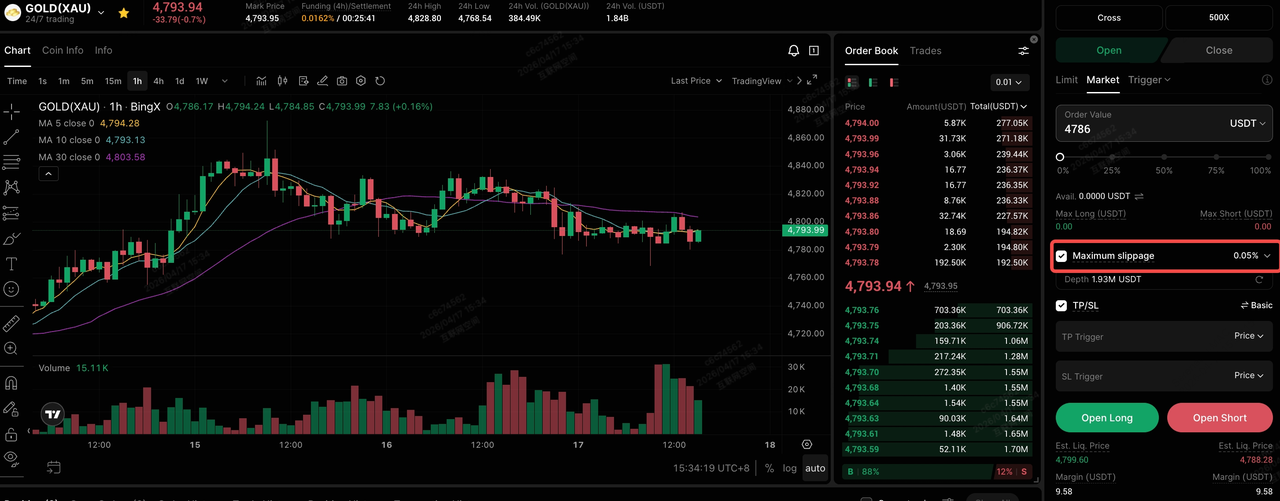
To give traders more control, more transparency, and safer trades, BingX market orders now include a Maximum Slippage setting. This allows you to define your acceptable price slippage range in advance. Your orders will only execute when the real-time market price stays within your pre-defined safety zone.
- Control in Your Hands: Set your price floor upfront to avoid extreme slippage during high volatility.
- Greater Transparency: The system only executes within your approved price range.
- Peace of Mind: No more worrying about slipping too far in fast markets, so you can focus entirely on your strategy.
Read more: Complete Guide to Order Types: What Are Market Orders, Limit Orders, TP/SL, Trigger Orders, and OCO?
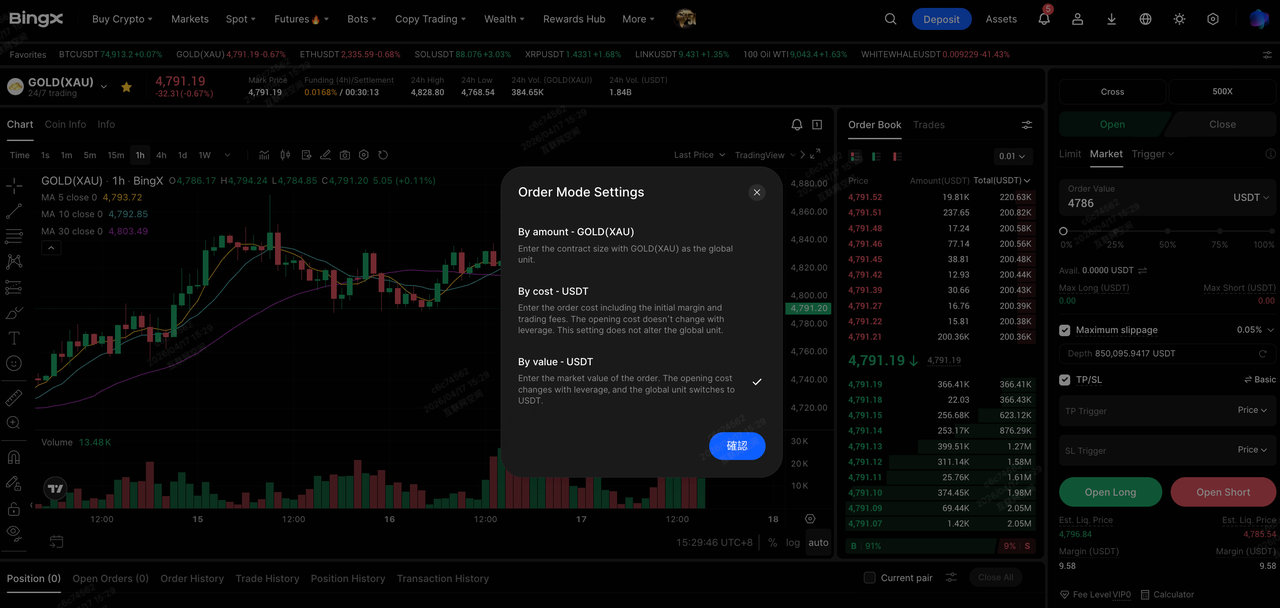
Understanding Market Order Modes: By Cost, By Amount, and By Value
When placing a market order on BingX, you can define your position size using three distinct modes to match your risk management style:
- By Cost: You specify the exact amount of USDT you want to spend from your available balance. This includes both the initial margin and the estimated trading fees.
- By Amount: You specify the quantity of the cryptocurrency, e.g., 0.5 BTC. The system then calculates the required margin based on your chosen leverage.
- By Value: You enter the total market value (notional value) of the order in USDT. Because this value is leveraged, your actual opening cost (margin) will shift automatically as you adjust your leverage slider.
Market Order vs. Limit Order: The Essentials of Execution
While a market order is a sprint to get into the market, a limit order is a marathon wait for the perfect price. Understanding the trade-offs is vital for managing your 2026 trading strategy.
Key Differences Between Market and Limit Orders
|
Feature |
Market Order |
Limit Order |
|
Execution Speed |
Immediate / Instant |
Delayed (Depends on Market) |
|
Price Control |
None (Filled at Best Available) |
High (Filled at Specific Price or Better) |
|
Fill Certainty |
Guaranteed (if liquid) |
No Guarantee |
|
Fee Type |
Taker Fee (Higher) |
Maker Fee (Lower) |
|
Primary Goal |
Speed of Entry/Exit |
Price Precision |
The fundamental trade-off between market and limit orders centers on the Execution-Price Paradox: you can guarantee when you trade, or at what price, but rarely both. Market orders prioritize temporal certainty, making them essential for capturing 2026’s high-velocity breakouts where a 5-second delay can result in a 2-3% price gap. However, this speed comes at a literal cost; by crossing the bid-ask spread, market orders incur taker fees (often 0.04%-0.06% on major exchanges) and are susceptible to slippage. In thin books with low depth, a large market buy can sweep multiple price levels, significantly raising the average entry price above the last seen Mark Price.
Conversely, limit orders function as passive liquidity, allowing traders to act as market makers and often qualify for reduced or even zero maker fees. By anchoring orders at specific technical levels, such as the 0.618 Fibonacci retracement or a high-volume node, traders eliminate the risk of overpaying during a scam wick. The strategic risk, however, is opportunity cost: if the market misses a limit buy by a single tick before a major rally, the trader remains in cash while the move unfolds. In the automated environment of 2026, professional strategies often layer limit orders in ladders to average into positions, while reserving market orders strictly for emergency risk mitigation or high-conviction momentum triggers.
However, with the addition of Maximum Slippage settings, BingX has bridged the gap, allowing market order users to enjoy speed without the risk of catastrophic price fills in thin order books.
When to Use Market Orders on BingX Futures
Professional traders don't use market orders for every trade. Instead, they reserve them for specific high-stakes scenarios:
- Entering a Breakout: When an asset clears a major resistance level with high volume, waiting for a retest limit order might cause you to miss a 10% move. A market order gets you in the trend immediately.
- Emergency Exits (Stop Out): If a trade goes against you and the price is crashing, a market order ensures you exit the position before your losses escalate or you face liquidation.
- Set Maximum Slippage (Optional): Define your acceptable slippage percentage to ensure the trade only executes within your safety zone.
- High Liquidity Assets: Market orders are safest when trading mainstream assets like BTC or ETH, where the order books are deep and the spread is razor-thin, minimizing slippage.
- Executing TP/SL: Most automated Stop-Loss triggers on BingX function as Stop-Market orders, ensuring that once your risk level is hit, you are out of the trade instantly.
How to Place a Market Order on BingX: Step-by-Step
BingX offers a streamlined interface to ensure you can execute market trades in seconds.
Selecting Your Order Type on BingX Web
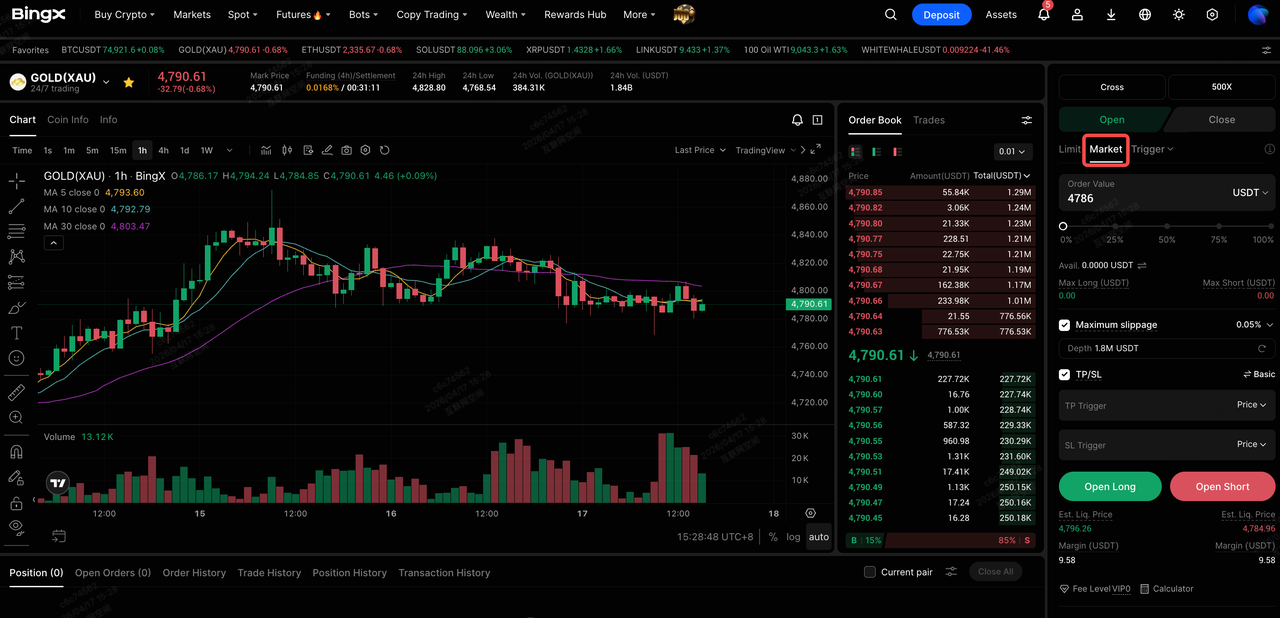
1. Navigate to Futures: Open the Perpetual Futures trading page and select a contract, e.g., BTC/USDT perpetuals.
2. Select Market: In the order panel on the right, click the Market tab.
3. Adjust Slippage Settings: Tap the settings icon to input your Maximum Slippage range.
4. Choose Order Mode: Use the dropdown to select By Cost, By Amount, or By Value.
5. Execute: Click Open Long or Open Short. Your position will appear instantly in the Positions section below the chart.
Selecting Your Order Type on the BingX App
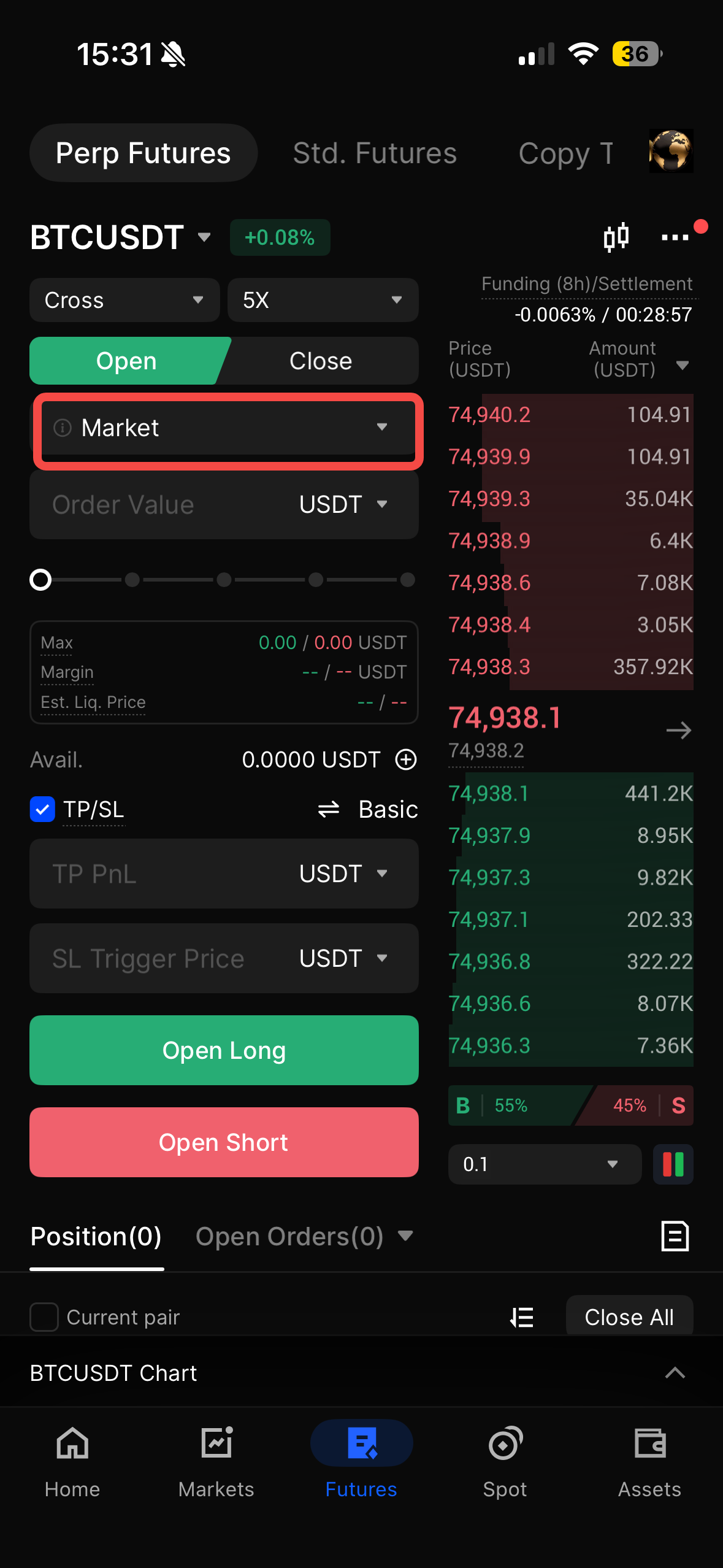
1. Trade Tab: Tap Futures at the bottom and select your pair.
2. Toggle Order Type: Tap the dropdown menu (usually defaults to Limit) and select Market.
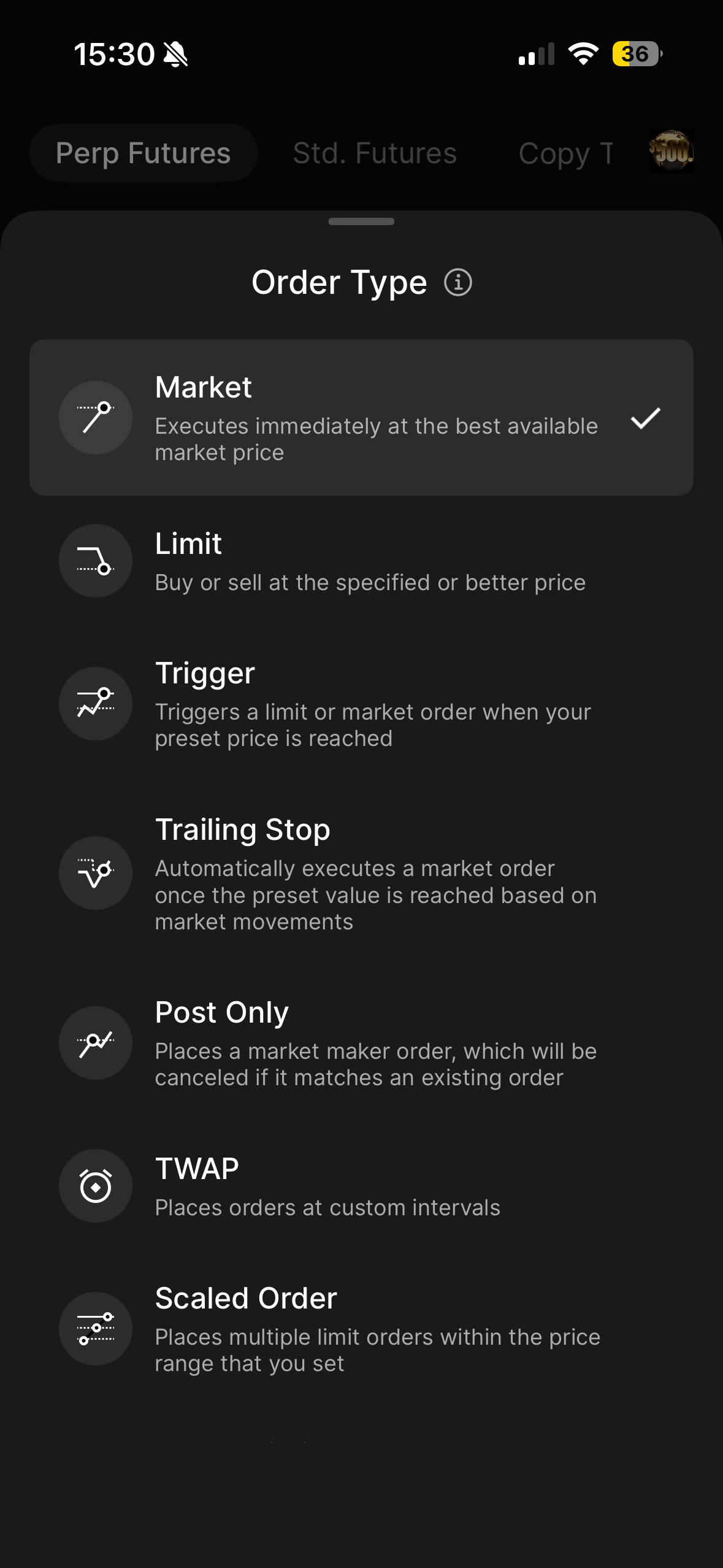
3. Adjust Slippage Settings: Tap the settings icon to input your Maximum Slippage range.
4. Enter Quantity: Use the slider or manual input to set your position size.
5. Confirm: Tap the green or red button to fill the order at the current market rate.
Top 5 Tips for Futures Traders Using Market Orders on BingX
To maximize your efficiency and protect your capital, follow these professional guardrails when executing immediate trades in the high-stakes 2026 futures market.
- Avoid Thin Markets: Never use large market orders on low-cap altcoins with low Size (liquidity) in the order book. You may experience massive slippage.
- Check the Spread: Before clicking Buy, look at the gap between the red (Ask) and green (Bid) prices. If the gap is wide, a market order will be expensive.
- Use the Maximum Slippage Tool: Always define your price range during high volatility to avoid fat finger fills or extreme price gaps.
- Combine with TP/SL: When you enter via a market order, immediately set your Take-Profit and Stop-Loss to manage the risk of the instant position.
- Account for Fees: Remember that Taker fees are slightly higher. Ensure your projected profit margin covers the cost of entering and exiting at market prices.
Conclusion: Trade Futures with Speed and Precision in 2026
The Market Order remains the most vital tool for traders who prioritize action over observation. By decoupling your entry from a fixed price, BingX allows you to interact with the global market in real-time, ensuring you are never left behind during a major trend.
However, speed should not replace strategy. While a market order guarantees you a seat at the table, it is your job to ensure the price you pay is worth the entry. Always use the BingX Order Book to check depth before executing large market trades.
Ready to test your speed? Open a BingX Account and practice using market orders with our VST (Virtual Support Token) in a risk-free demo environment.
Related Reading
- How to Get Started with Perpetual Futures Trading on BingX: A 2026 Beginner's Guide
- What Are the Different Order Types Supported on BingX Futures and How to Use Them?
- Cross Margin vs. Isolated Margin to Master Your Risk on BingX Futures: A 2026 Beginner's Guide
- 2026 Guide to Risk Management on BingX Futures: Protect Your Capital with Professional-Grade Tools
- What Is Mark Price in Futures Trading and How to Use It on BingX Futures? A 2026 Guide
FAQs on Market Orders
1. Why was my filled price different from the price on the chart?
This is slippage. The chart shows the Last Price, but a market order fills at the best Available Price in the order book. In fast-moving markets, these two can differ by a small percentage.
2. Do market orders have higher fees?
Yes. Market orders use Taker Fees because they take liquidity from the order book. Limit orders use Maker Fees, which are often lower as an incentive for providing liquidity.
3. Can a market order be partially filled?
In futures trading, market orders are typically filled in full. However, if the order is exceptionally large and exceeds the available liquidity, the system may fill what it can or execute across multiple price levels.
4. Is a market order the same as a Trigger Order?
No. A market order executes the moment you click. A Trigger Order only becomes a market order after the price hits a specific level you've set.
