
Navigating the high-octane 2026 futures market requires more than just a directional bias; it requires a surgical approach to how you structure your positions. On BingX, the choice between Hedge Mode and One-Way Mode is the foundational setting that dictates how you interact with the order book. Whether you are looking to lock in profits during a volatile retracement or prefer the streamlined simplicity of 'buy low, sell high' spot-style trading, your position mode is your primary strategic tool.
As a top 5 global derivatives exchange, BingX provides these dual modes to suit both institutional-grade hedgers and retail beginners. By mastering the mechanics of each, you can trade with higher precision; choosing between the complex risk management of simultaneous positions or the high-speed execution of a single-track portfolio.
This guide breaks down exactly what these modes are, the mathematical benefits of Self-Trading in Hedge Mode, key differences between Hedge Mode and One-Way Mode, and how to seamlessly switch your setup to align with your personal trading style in 2026.
What Is Hedge Mode and How Does It Work on BingX Futures?
Hedge Mode is the default setting for BingX Perpetual Futures, enabling users to hold long and short positions for the same trading pair simultaneously in cross margin mode. In this configuration, your long and short trades are treated as independent positions, each with its own entry price and unrealized PnL. This allows for sophisticated risk management where profit from one direction can offset the loss from the other, effectively locking value during periods of extreme market uncertainty.
Full Hedge vs. Partial Hedge Mode on BingX Futures Market: Key Differences
Traders utilize Hedge Mode in two primary ways depending on their risk appetite and market outlook:
- Full Hedge (Net Zero Exposure): This occurs when the long position size is exactly equal to the short position size for the same pair. Price fluctuations do not increase the liquidation risk of the trading pair or affect the overall account balance.
- If you hold a 2 BTC long and open a 2 BTC short, any unrealized loss on the long side is fully covered by the unrealized profit on the short side. This is often used to protect capital during scam wicks or while waiting for high-impact news.
- If you hold a 2 BTC long and open a 2 BTC short, any unrealized loss on the long side is fully covered by the unrealized profit on the short side. This is often used to protect capital during scam wicks or while waiting for high-impact news.
- Partial Hedge (Directional Bias): This occurs when the long and short positions are of different sizes. Only the overlapping portion offsets gains and losses; the trader remains exposed to the profit or loss of the net position.
- If you hold a 4 BTC long and a 2 BTC short, you are effectively trading a 2 BTC net long position. This allows you to maintain a primary long-term bullish thesis while using a smaller short position to scalp short-term downward retracements.
BingX Hedge Mode: The Self-Trading Safety Net
A standout feature of the BingX ecosystem is the Self-Trading mechanism, an automated risk management tool designed to prevent forced liquidations in cross margin accounts. When market volatility causes your risk ratio to approach the liquidation threshold, the system automatically intervenes. The system matches and offsets existing long and short positions under the same trading pair, closing them out instantly.
By automatically closing the hedged portions, the system reduces the total required maintenance margin and lowers the overall liquidation risk for the account. Any remaining unhedged portion of the position stays open for continued trading.
Read more: Perpetual Futures|Hedge Mode / Self-Trading
What Is One-Way Mode and Why Use It on BingX Futures?
One-Way Mode simplifies the futures experience by allowing you to hold a position in only one direction at a time. If you hold a long position and decide to open a short position of the same size, the short order will simply close your long position rather than opening a second, opposing trade.
How One-Way Mode Works in Futures Trading
Unlike Hedge Mode, where opposing positions coexist, One-Way Mode uses new orders to either offset or flip existing exposure. For example, if you hold a 10 BTC long position and execute a 20 BTC short order without selecting Reduce-Only, the system will automatically close your entire long position and simultaneously open a new 10 BTC short position. This linear execution is highly practical for beginners who want to avoid the complexity of managing dual margin requirements, and for API traders who prioritize lower margin utilization and simplified PnL tracking.
Key Benefits of One-Way Mode in Trading BingX Futures
- Streamlined Execution: It functions exactly like spot trading or traditional stocks and forex. You don't need to select Open or Close; you simply buy to go long or sell to go short.
- Lower Margin Utilization: Because you cannot hold opposing positions, your margin is never trapped in a hedge, making it a favorite for API and algorithmic strategy traders.
- Simplified Management: Ideal for beginners and Copy Traders, as it eliminates the mental overhead of managing two different entry prices and stop-losses for the same asset.
Key Differences: Hedge Mode vs. One-Way Mode
|
Feature |
Hedge Mode (Default) |
One-Way Mode |
|
Direction |
Hold Long & Short simultaneously |
Hold only one direction at a time |
|
Opening/Closing |
Must choose Open or Close tabs |
Use spot-style Buy or Sell |
|
Leverage |
Different leverage for Long vs. Short |
Single leverage for the contract |
|
Liquidation Risk |
Lower (Hedged PnL offsets) |
Standard (Directional risk) |
|
Best For |
Advanced risk management & hedging |
Beginners, APIs, & Copy Trading |
Hedge Mode functions as a risk-mitigation shield by allowing the simultaneous maintenance of long and short positions for a single contract, a configuration where Full Hedging can effectively lock in PnL and neutralize the impact of price volatility on account balances. This mode is distinguished by its dual-leverage flexibility, enabling traders to set independent leverage levels for each direction, and its automated Self-Trading safety net, which triggers when risk ratios approach liquidation to offset matching position sizes and reduce required maintenance margin. Practically, this is essential for complex strategies; for instance, a user with a 10 BTC long at $60,000 can open a 5 BTC short at $59,500 to hedge downside risk, maintaining an active net exposure of 5 BTC long while keeping both individual entry points active.
In contrast, One-Way Mode operates with spot-like linear execution, where a trader can only hold a position in one direction, causing opposing orders to automatically cancel or reduce existing ones. For example, if a trader holds a 10 BTC long and executes a 20 BTC short order without Reduce-Only enabled, the system will close the long and open a 10 BTC short position in a single sequence. This mode is highly data-efficient for high-frequency or API traders due to its lower margin utilization and simplified management, as it eliminates the need to toggle between Open and Close tabs required in Hedge Mode. While it offers a more streamlined workflow for beginners and copy traders, it lacks the advanced liquidation protection of the Hedge Mode’s dual-position offsetting mechanics.
How to Switch Between Hedge Mode and One-Way Mode on BingX: Step-by-Step
Before attempting to switch, ensure you have no active positions or open orders. On BingX, the position mode setting applies to all contracts globally across the account.
How to Choose Hedge or One-Way Mode on the BingX Web Interface
- Enter Perpetual Futures: Log in and navigate to the Perpetual Futures trading terminal.
- Open Settings: Click on the three-dot icon (...) located in the upper right-hand corner of the trading page.
- Navigate to Preferences: Select Preferences from the dropdown menu.
- Select Position Mode: Click on the Position Mode tab.
- Toggle and Confirm: Select either Hedge Mode or One-Way Mode and click confirm to apply the change to your account.
Switching Between Hedge and One-Way Modes on the BingX Mobile App
1. Access Futures Tab: Open your BingX App and tap the Futures button at the bottom, then select Perpetual Futures at the top.
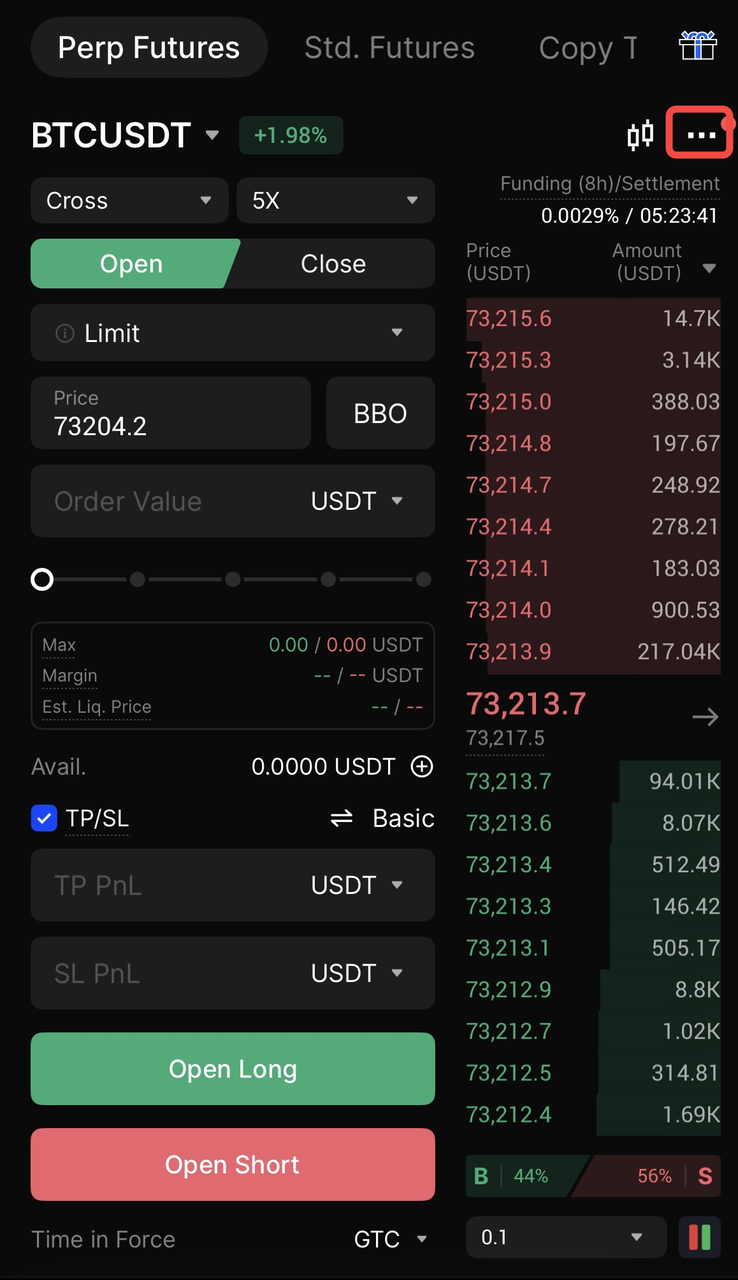
2. Menu Icon: Tap the three-dot icon (...) in the top right corner of the screen.
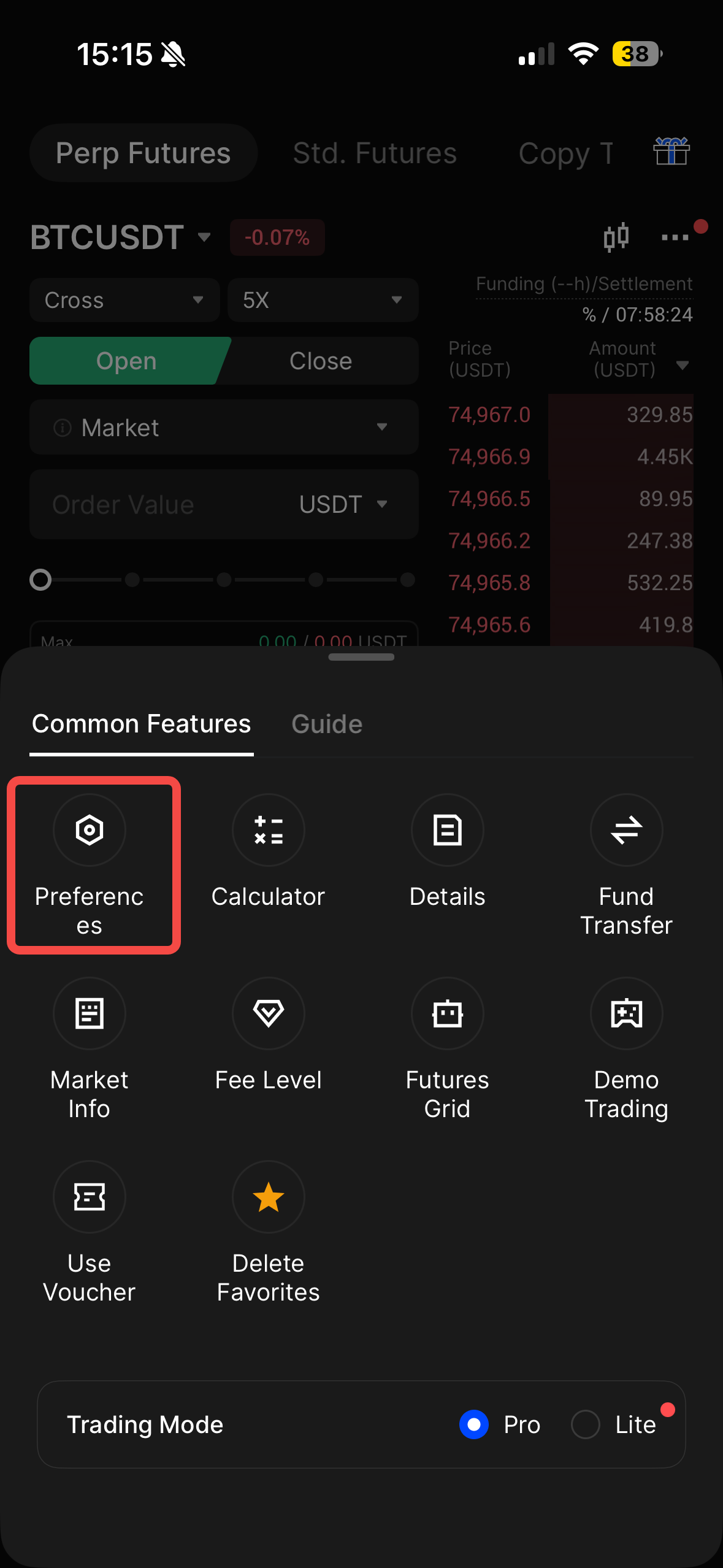
3. Enter Preferences: Tap on Preferences in the Common Features menu.
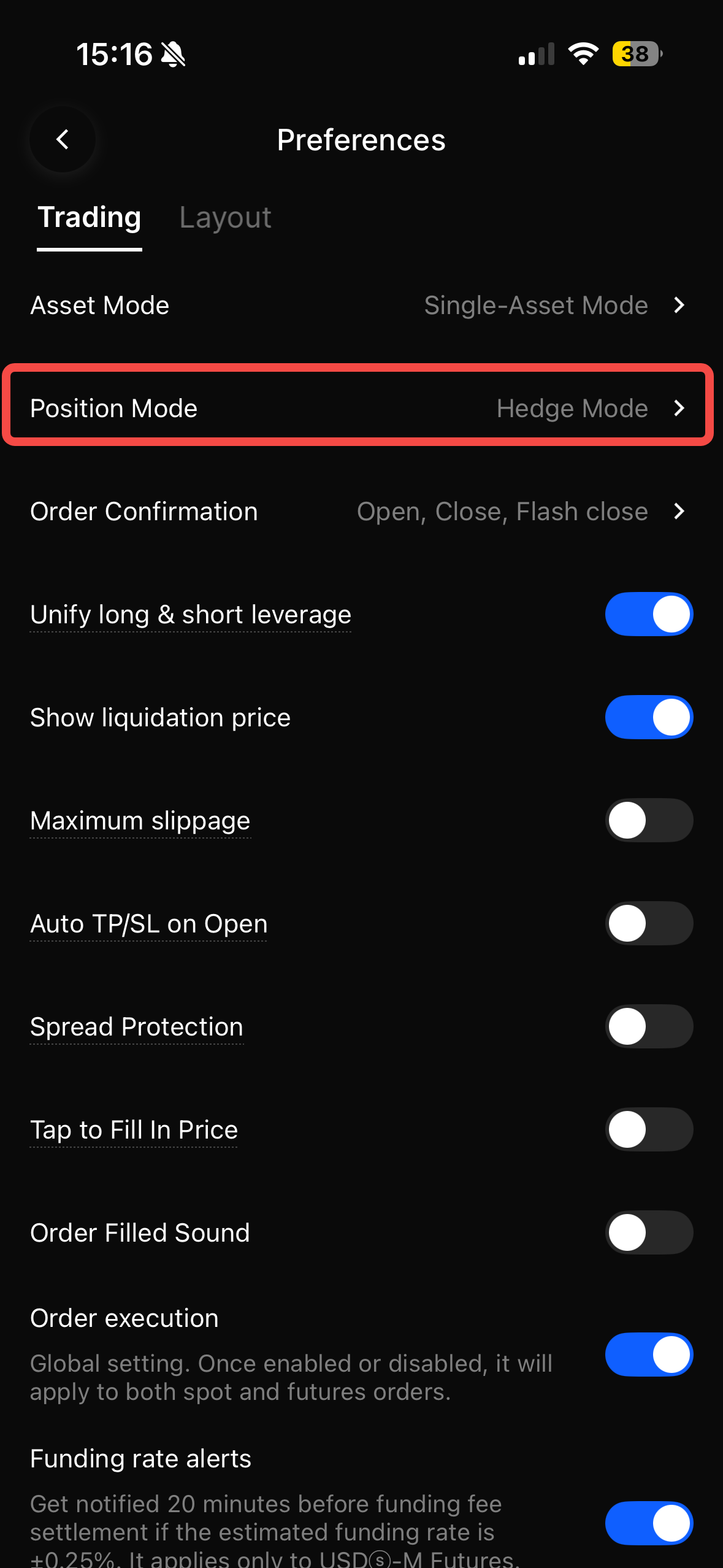
4. Change Mode: Tap on Position Mode, which will display your current setting, such as Hedge Mode.
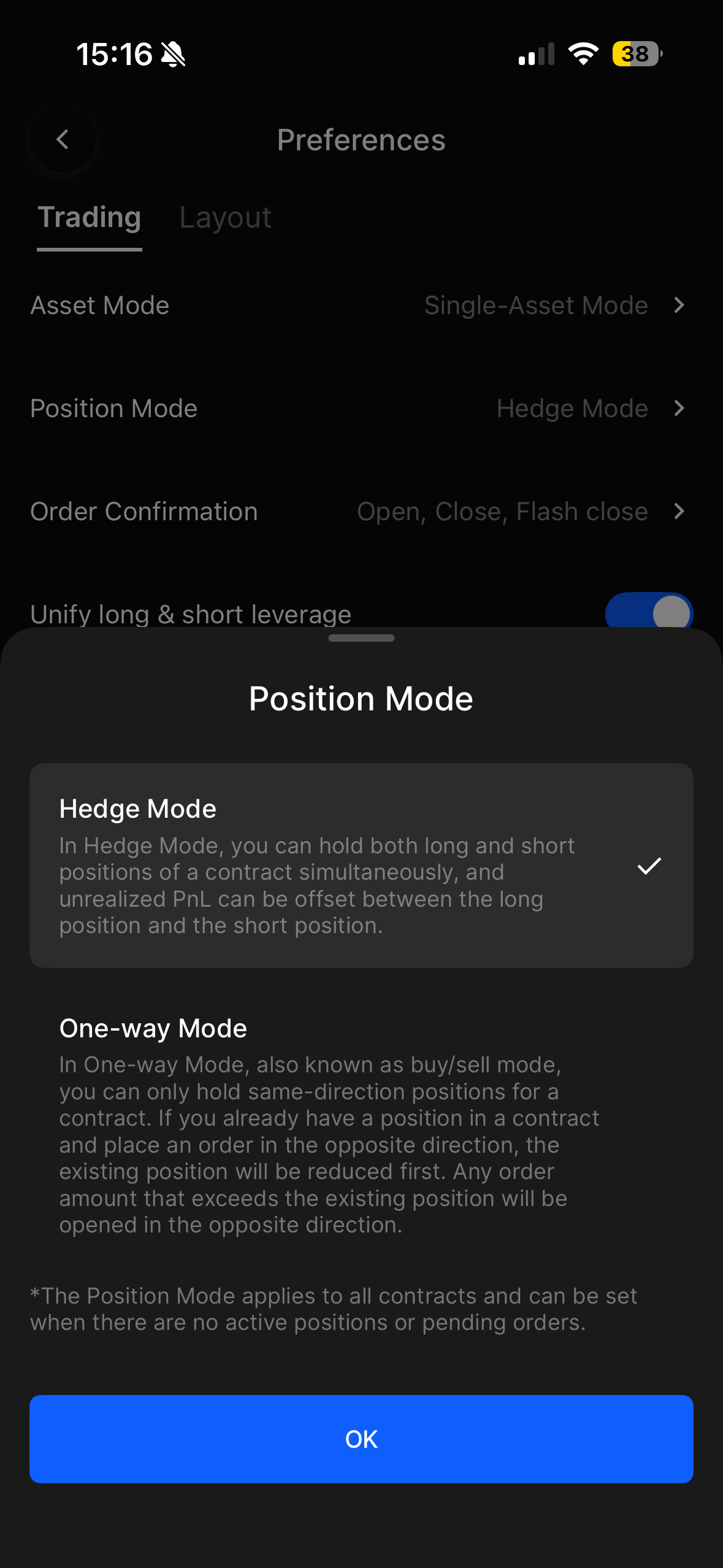
5. Apply Selection: Choose One-Way Mode or Hedge Mode from the list. A blue checkmark will indicate your active selection.
Important Reminder: If you receive an error, double-check that you have closed all triggers, limit orders, and active positions, as the system requires a clean dashboard to implement the technical shift in your account architecture.
Pro Tips for Choosing Between Hedge Mode and One-Way Mode in 2026
Selecting the right position mode is a strategic decision that should align with your specific risk tolerance and the current volatility profile of the market.
- The Volatility Insurance Strategy: Use Hedge Mode during high-impact economic events, such as FOMC meetings or CPI releases, to open equal long and short positions simultaneously. This allows you to lock your account balance against erratic scam wicks while waiting for a confirmed trend to emerge, at which point you can close the losing leg and let the winner run.
- The Net-Exposure Calculation: In One-Way Mode, remember that the system functions on a net-result basis; if you hold a 10 BTC long position and place a 20 BTC short order without Reduce-Only selected, your long will be fully closed and replaced by a 10 BTC short position. This is highly efficient for traders who want to flip their market bias instantly without managing two separate tickets.
- Automated Liquidation Defense: Take advantage of the Self-Trading mechanism in Hedge Mode, which acts as a built-in safety net by automatically offsetting matching long and short sizes if your risk ratio hits a critical threshold. This reduces your total maintenance margin requirement dynamically, potentially saving a core position from liquidation during flash crashes.
- API and Scalping Efficiency: For high-frequency traders or those using automated Grid bots, One-Way Mode is typically preferred due to its lower margin utilization and streamlined Buy/Sell logic. It eliminates the Open/Close selection step required in Hedge Mode, reducing execution latency and simplifying the tracking of realized PnL.
- Feature Compatibility Check: Before switching, note that One-Way Mode in 2026 does not support the Guaranteed Stop-Loss, Order by Cost, or the Simplified Version of the futures interface. If your risk management plan relies on these specific BingX protection tools, you must remain in Hedge Mode.
Conclusion: Which Mode Is Better for Futures Traders, Hedge or One-Way?
The choice between Hedge Mode and One-Way Mode on BingX is a strategic decision that should be based on your specific risk management requirements and operational complexity. Hedge Mode provides a sophisticated technical framework for traders who need to navigate high volatility by holding simultaneous opposing positions to lock in unrealized PnL or utilize automated Self-Trading to lower maintenance margin requirements. Conversely, One-Way Mode offers a streamlined, spot-like experience that is ideal for beginners, copy traders, and those utilizing API strategies that prioritize execution speed and lower margin utilization.
Regardless of the mode selected, users must remain acutely aware of the inherent risks associated with high-leverage futures trading. While Hedge Mode can mitigate certain directional risks, it does not eliminate the possibility of total capital loss, especially during extreme market shifts where maintenance margins may still be breached. Traders are strongly encouraged to utilize the BingX Demo Account to practice switching between these modes and to always employ disciplined stop-loss orders to protect their primary collateral.
Related Reading
- How to Get Started with Perpetual Futures Trading on BingX: A 2026 Beginner's Guide
- What Are the Different Order Types Supported on BingX Futures and How to Use Them?
- Cross Margin vs. Isolated Margin to Master Your Risk on BingX Futures: A 2026 Beginner's Guide
- 2026 Guide to Risk Management on BingX Futures: Protect Your Capital with Professional-Grade Tools
- How to Calculate Profit and Loss (PnL) on BingX Futures: A 2026 Guide to Futures Profitability
- What Is Stop-Loss and Take-Profit in Futures Trading and How to Use Them on BingX?
FAQs on Hedge vs. One-Way Position Modes
1. Does switching between hedge and one-way modes affect my existing fees?
No, trading fees remain the same regardless of the mode. However, Hedge Mode may involve more transactions (opening two sides), which can result in higher total trading costs.
2. Can I use different leverage for my hedge?
Yes. In Hedge Mode, BingX allows you to set independent leverage for your long and short positions, giving you granular control over your margin.
3. What happens if I am in One-Way Mode and click "Reduce-Only"?
Reduce-Only orders in One-Way Mode ensure that your trade only closes an existing position and never opens a new one in the opposite direction.
