
Navigating the high-velocity 2026 futures market requires more than manual execution; it requires automation that works while you sleep. On BingX, Trigger Orders are the cornerstone of professional risk management, allowing you to set 'if-then' instructions that execute only when the market hits your specific price targets. Whether you are hunting a breakout or protecting your capital from a flash crash, trigger orders ensure you aren't tethered to your screen 24/7.
As a top 5 global derivatives exchange, BingX offers sophisticated trigger mechanisms, including the 2% slippage protection and the industry-leading Guaranteed Price, to ensure your orders are handled with surgical precision. By mastering trigger logic, you can transform from a reactive trader into a strategic one, knowing exactly when your Take-Profit (TP) will lock in gains and where your Stop-Loss (SL) will cut your risk.
This guide breaks down exactly how Trigger Orders function, the importance of the 'Close On Trigger' mechanism, and how to utilize BingX’s exclusive tools to achieve zero-slippage execution.
What Is a Trigger Order and How Does It Work in the Futures Market?
A Trigger Order is a conditional command that remains dormant until the market reaches a specific Trigger Price. Unlike a market order that fills instantly, or a limit order that sits in the order book, a trigger order is only placed by the system once your conditions are met.
In the 2026 trading environment, these orders are primarily used for two purposes:
- Entry (Stop-Limit/Stop-Market): Entering a trade only after a price breakout occurs.
- Exit (TP/SL): Automatically closing a position to realize profits or prevent liquidation.
Because these orders do not enter the order book immediately, they do not freeze your margin until the trigger price is hit (unless specifically set as a TP/SL on an active position). This allows for greater capital flexibility across multiple potential setups.
Read more: Complete Guide to Order Types: What Are Market Orders, Limit Orders, TP/SL, Trigger Orders, and OCO?
How Trigger Orders Work on BingX Futures: Key Mechanics
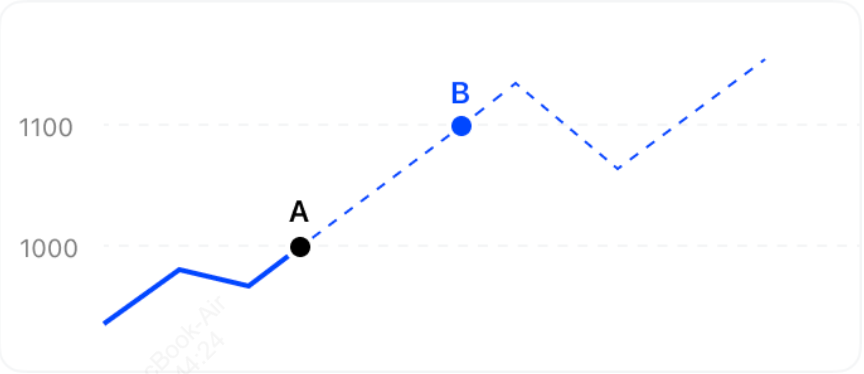
How trigger orders work: Current price (A) vs. Trigger price (B)
BingX has engineered its trigger system to handle extreme volatility while protecting user interests. Here are the core technical pillars:
1. The 2% Protection Reality Check
When a trigger order activates and executes as a Market Order, BingX applies a 2% fill protection cap. Specifically, the system limits how far from the current market price your market order can be filled — any portion of the order that would fill beyond that 2% deviation is automatically cancelled rather than filled at a disastrously unfavorable price.
Critical Note: This 2% protection applies to the market order execution stage, not the trigger activation itself. Real-world extreme volatility, such as the RAVE-USDT incident, demonstrates that this is a safety guardrail, not a slippage guarantee. In deeply illiquid conditions, gaps can exceed 2% and trigger a full cancellation. For absolute price certainty regardless of market conditions, use the Guaranteed Price feature instead of a Market trigger.
2. Close On Trigger
This is a vital safety feature on BingX futures. When enabled, the order will only reduce or close an existing position. It prevents position flipping, where a stop-loss accidentally opens a new opposite-direction trade if you had already closed the original trade manually.
What Is Guaranteed Price on BingX and How Does It Eliminate Slippage for VIPs?
In 2026, slippage is the silent killer of profits. BingX’s Guaranteed Price ensures your Stop-Loss fills exactly at your price, regardless of market gaps.
VIP Quota Transparency
Free daily usage quotas scale progressively with your VIP tier. Lower tiers receive a smaller daily allowance, while Supreme VIP unlocks the highest quota. For instance:
- VIP 1: Typically 2 free uses per day.
- Supreme VIP: Up to 10 free uses per day.
Note: BingX adjusts these allocations periodically, always verify your current entitlement directly on the BingX VIP Benefits page before building a strategy around a specific number of daily uses.
Trigger Order vs. TP/SL (Take-Profit, Stop-Loss): Understanding the Difference
While often used interchangeably, there are subtle differences in how BingX handles these instructions.
|
Feature |
Trigger Order (General) |
TP/SL (Position-Based) |
|
Margin Usage |
Does not freeze margin until triggered. |
Freezes quantity and margin immediately. |
|
Primary Use |
Opening new positions or complex exits. |
Protecting and closing an active trade. |
|
Binding |
Independent of any specific position. |
Tied directly to a specific open position. |
The primary distinction between a general Trigger Order and a TP/SL instruction lies in margin management and intent. A Trigger Order is a latent command that stays outside the active queue and does not freeze your margin or position until the trigger price is hit. This provides maximum capital flexibility for managing multiple breakout setups simultaneously, though it carries the risk that the order will fail if your available margin is insufficient at the moment of execution.
In contrast, a TP/SL (Take-Profit/Stop-Loss) is explicitly bound to an active position and immediately freezes the corresponding quantity to ensure assets are reserved for the exit. This ironclad protection often utilizes the Close On Trigger mechanism to prevent position flipping, an error where an old stop-loss opens a new unintended trade after you’ve already closed the position manually. While both are subject to market slippage, professional strategies prioritize TP/SL for risk mitigation on open trades and reserve general Trigger Orders for strategic entries.
When to Use Trigger Orders on BingX Futures
Strategic use of trigger orders separates professional traders from hobbyists:
- Trading the Breakout: Set a Trigger Order to Buy/Long just above a major resistance level. You only enter the trade if the momentum is confirmed.
- The Sleep-Well Stop-Loss: Always attach a Trigger SL to every position. In 2026’s 24/7 market, a 10-minute price gap can happen at any time.
- Protecting Profits (Trailing): Use Trigger Orders to staircase your profits. As the price rises, move your trigger price up to lock in gains.
- Avoiding Over-Leverage: Since standard Trigger Orders don't freeze margin, you can set multiple 'if-then scenarios across different pairs without tying up your entire wallet balance.
How to Place a Trigger Order on BingX: Step-by-Step Guide
Whether you are on the web or the mobile app, setting a trigger is intuitive.
How to Configure Trigger Orders on the BingX Web Interface
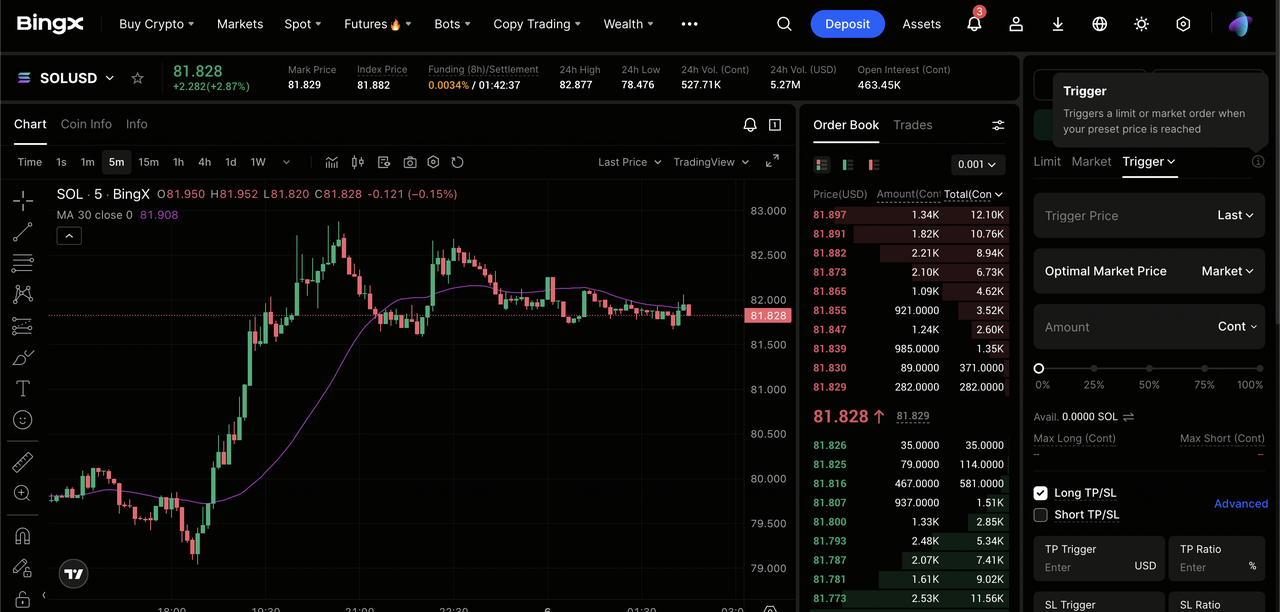
- Select Contract: Go to Perpetual Futures and choose your pair, e.g., SOL/USDT perpetual contract.
- Select Trigger Tab: In the order panel, switch from Limit or Market to Trigger.
- Set Trigger Price: Enter the price that will wake up your order.
- Set Order Price: Choose Market for an instant fill or enter a specific Limit price.
- Enable Guaranteed Price (Optional): If you are a VIP or want zero slippage, toggle the Guaranteed Price switch.
- Confirm: Click Open Long or Open Short.
Set a Trigger Order on the BingX Mobile App
- Open Trade: Tap Futures and select your trading pair.
- Switch Order Type: Tap the dropdown menu and select Trigger Order.
- Input Parameters: Enter your Trigger Price and the amount you wish to trade.
- Advanced Settings: Tap TP/SL to add exit triggers simultaneously with your entry.
- Place Order: Confirm the trade. You can view it under the Trigger Orders tab in your open orders list.
Top 3 Tips for Using Trigger Orders in Futures Trading in 2026
To elevate your execution from basic automation to institutional-grade precision, incorporate these strategic guardrails into your 2026 BingX trading workflow.
- Use Mark Price for SL: To avoid being 'wicked out' by a single exchange's volatility, set your trigger basis to Mark Price, an aggregate of global spot prices.
- Monitor Liquidity: In mid-cap altcoins, the 2% threshold is more likely to be hit. If your order is canceled, it’s a sign the market moved too fast for a safe market fill.
- The 'Reduce-Only' Rule: Unless you are trying to flip your position, e.g., go from Long to Short, always ensure your exit triggers are set to Close On Trigger.
Conclusion: Mastering the 'If-Then' of 2026 Futures Trading with Trigger Orders
Trigger orders are the ultimate tool for disciplined execution in the 2026 futures market, shifting the trader’s role from a reactive observer to a proactive strategist. By automating conditional logic, BingX allows you to decouple your emotional state from price action, ensuring that profit targets are captured and risk is mitigated even when you are away from your terminal. Whether utilizing the Guaranteed Price feature to eliminate slippage or employing Close On Trigger to prevent unintended position flips, these tools provide the technical infrastructure necessary to handle high-velocity market moves with institutional-grade precision.
However, while automation enhances efficiency, it does not provide a hedge against market direction or systemic risk. It is critical to remember that the cryptocurrency market remains inherently volatile; trigger orders can fail due to extreme price gaps exceeding the 2% threshold, or a lack of sufficient margin at the moment of activation.
Risk Reminder: Trading futures involves significant risk of capital loss. Always verify your trigger parameters, account for potential taker fees, and never invest more than you can afford to lose. Success in 2026 requires a balanced approach that combines automated precision with a rigorous manual review of your overall risk exposure.
Related Reading
- How to Get Started with Perpetual Futures Trading on BingX: A 2026 Beginner's Guide
- What Are the Different Order Types Supported on BingX Futures and How to Use Them?
- What Is Mark Price in Futures Trading and How to Use It on BingX Futures?
- What Is Limit Order in Futures Trading and How to Use It on BingX Futures?
- What Is Market Order in Futures Trading and How to Use It on BingX Futures?
FAQs on Using Trigger Orders in Futures Trading
1. Why was my Trigger Order canceled instead of executed?
The most common reason for a canceled trigger on BingX is the 2% Price Threshold. In the high-velocity 2026 market, if the gap between the market price and your preset trigger price exceeds 2% at the millisecond of activation, the system cancels the order to protect you from extreme slippage. Additionally, ensure you have sufficient margin; if you lack the required collateral at the moment of the trigger, the order will fail to place.
2. What is the difference between Last Price and Mark Price triggers?
Last Price refers to the most recent transaction price specifically on the BingX exchange. Mark Price is a more stable, calculated value derived from an aggregate of multiple global exchanges. Professionals often use Mark Price for Stop-Loss triggers to avoid stop-hunting or being liquidated by temporary, exchange-specific price wicks that don't reflect the broader market trend.
3. Does a Trigger Order freeze my available balance?
A standard Trigger Order used for opening a position does not freeze your margin or balance until the trigger price is hit. This allows you to set multiple potential entries across different assets without locking up your capital. However, a TP/SL (Take-Profit/Stop-Loss) attached to an existing position will freeze the corresponding position quantity to ensure the exit can be executed.
4. How can I guarantee my Stop-Loss fills at my exact price during a flash crash?
Standard Market Stop-Loss orders are subject to slippage during high volatility. To guarantee your exact exit price, you should use the BingX Guaranteed Price feature. This exclusive tool ensures your order fills at the precise trigger price regardless of market gaps. For VIP users, this feature includes daily free usages for orders up to 2,000,000 USDT.
5. Can a Trigger Order open a position in the wrong direction?
This can happen if you manually close a trade but forget to cancel your original Stop-Loss trigger. To prevent this position flip, always enable the Close On Trigger or Reduce-Only option. This instruction tells the system to only close or reduce an existing position; if no position exists when the price is hit, the trigger will simply cancel itself rather than opening a new, unintended trade.
