
Surviving the volatility of the 2026 crypto market requires more than just a sharp eye for trends; it requires an automated exit strategy. On BingX, Take-Profit (TP) and Stop-Loss (SL) are the primary tools that transform a speculative gamble into a professional trading plan. While leverage provides the power to move, TP/SL provides the brakes and the destination, ensuring you lock in gains before a reversal and cut losses before a liquidation.
As a global leader in derivatives, BingX has introduced a Unified TP/SL Model in 2026, offering traders unprecedented precision. From Guaranteed Stop-Loss features that offer 0 slippage to Partial Position settings that allow you to scale out of trades in stages, these tools are designed to suit high-frequency scalpers and long-term trend followers alike. By mastering these automated orders, you remove the emotional friction of manual trading and protect your portfolio from the sudden scam wicks often seen in leveraged markets.
This guide breaks down the mechanics of TP/SL, the 2026 Unified Model upgrade, and exactly how to deploy these safeguards on the BingX platform.
What are Take-Profit/Stop-Loss (TP/SL) Orders and How Do They Work?
In the futures market, take-profit (TP) and stop-loss (SL) are Trigger Orders that remain dormant until the market price hits your specified level.
- Take-Profit (TP): A Take-Profit order enables you to lock in unrealized gains. When the market reaches your target, the system automatically closes your position. Unlike a manual exit, a TP ensures you capture the peak of a move even if you are away from your screen.
- Stop-Loss (SL): A Stop-Loss is your ultimate safety net. It automatically exits a losing trade at a predetermined price to prevent further capital erosion. In the high-leverage environment of 2026, an SL is not optional; it is the free insurance policy that prevents a minor correction from turning into a total account wipeout.
How TP/SL Orders Work on BingX: Entire vs. Partial Position Execution in 2026
The BingX 2026 upgrade replaced fragmented order types with a Unified TP/SL Model. This system allows you to toggle between two execution philosophies based on whether you are managing a single trade or a complex, multi-stage strategy.
1. Entire Position: Dynamic Auto-Sync
In this mode, your TP/SL is tethered to your total holdings for a specific pair. It is the gold standard for hands-off risk management.
- Automatic Quantity Adjustment: If you hold 1 BTC with an Entire Position SL and then buy another 0.5 BTC, the system automatically updates your SL quantity to 1.5 BTC. You never have to worry about unprotected margin after adding to a winner.
- One-Click Liquidation Prevention: Once either the TP or SL is triggered, the system executes a Market Order for 100% of the remaining position, immediately canceling the opposing side to prevent accidental reverse positions.
Best For: Trend followers and swing traders who want their entire capital protected by a single, moving hard floor.
2. Partial Position: Multi-Stage Scaling
This mode provides granular control, allowing you to treat a single position as multiple independent trades.
- Segmented Exits: You can configure up to 20 unique TP/SL sets. For example, you can set a TP to close 25% of your position at a 2:1 reward ratio, another 25% at 3:1, and leave a runner for the remaining 50%.
- Mixed Order Types: Unlike the Entire mode, which uses Market orders, Partial Position allows you to choose between Market for guaranteed execution or Limit for guaranteed price orders for each segment.
- Fixed Quantities: These orders do not automatically scale. If you add to your position, you must manually assign new TP/SL orders to the additional margin.
How to Eliminate Slippage with BingX's Guaranteed Stop-Loss
One of BingX’s most exclusive 2026 features is the Guaranteed SL. In traditional crypto trading, if the market 'gaps' or skips prices during a crash, your SL might fill at a much worse price than intended.
By enabling Guaranteed SL on BTC/USDT or ETH/USDT perpetual contracts, BingX guarantees that your order is filled exactly at your preset price, regardless of market volatility. This Zero Slippage execution is essential for institutional-grade risk management.
What Are the Key Benefits of Using TP and SL Orders for Futures Traders?
Integrating automated exit points into your 2026 futures strategy transforms high-leverage trading from a game of reactive stress into a process of systematic capital growth.
- Emotional De-risking: By pre-defining your pain threshold and win target, you eliminate the psychological urge to hope a losing trade turns around or greedily" hold a winner until the market reverses.
- 24/7 Market Surveillance: Crypto never sleeps, but you do; TP/SL orders act as your digital sentry, executing trades during overnight volatility or flash crashes when you are away from your terminal.
- Precision Capital Efficiency: Using Partial TP allows you to scale out, securing initial profits to cover trading fees and initial risk while letting the remaining position run for maximum upside.
- Liquidation Protection: A well-placed Stop-Loss serves as a hard circuit breaker that triggers before the market reaches your bankruptcy price, preserving your remaining margin for the next opportunity.
- Slippage Elimination: Exclusive tools like BingX Guaranteed SL provide a mathematical certainty that your exit occurs at your exact price, even during the gaps and extreme liquidity voids common in 2026's fast-moving markets.
How to Calculate the Optimal Stop-Loss (SL) Levels in a Volatile Market
To calculate the optimal Stop-Loss (SL) distance, professional traders in 2026 move away from arbitrary percentages and instead use Volatility-Based Scaling to account for the market noise of specific assets.
1. The Gold Standard: The ATR (Average True Range) Method
The Average True Range (ATR) is the most reliable tool for this. It measures the average price range an asset moves over a set period (usually 14 days or 14 candles). By tying your SL to the ATR, you ensure your stop is wide enough to survive normal fluctuations but tight enough to protect your capital if a true trend reversal occurs.
How to Calculate TP and SL Levels using ATR
- For Long Positions: Stop-Loss = Entry Price - (ATR × Multiplier)
- For Short Positions: Stop-Loss = Entry Price + (ATR × Multiplier)
How to Choose Your Multiplier
- Conservative (Swing Trading): Use a 2.5x to 3x multiplier. This places your stop outside the 95% probability of normal noise, making it very difficult to be stopped out by a random wick.
- Balanced (Day Trading): A 2x multiplier is the industry standard. It offers a fair compromise between risk-to-reward and protection.
- Aggressive (Scalping): Use a 1.5x multiplier. This requires high precision but allows for much larger position sizes.
2. The Statistical Approach: Standard Deviation with Bollinger Bands
If you prefer a mathematical probability model, use the Standard Deviation (SD). This method assumes that price action follows a normal distribution.
- 1 SD: Covers roughly 68% of price movement. (Too tight for most crypto trades).
- 2 SD: Covers roughly 95% of price movement. This is the default setting for Bollinger Bands.
Place your Stop-Loss just outside the Lower Bollinger Band for Longs or the Upper Bollinger Band for Shorts. If the price closes outside these bands, the volatility regime has officially changed, and your trade idea is likely invalidated.
Practical 2026 Checklist for BingX Futures Traders
- Check the ATR Value: Look at the ATR on your current timeframe, e.g., if the 1H ATR for BTC is $400.
- Apply the Multiplier: For a balanced trade, multiply $400 x 2 = $800.
- Set the Distance: Your SL should be $800 away from your entry.
- Adjust Position Size: If your stop-loss distance is wide, decrease your leverage/size to ensure your total dollar risk stays the same, e.g., you only risk 1% of your total account.
How to Set Take-Profit and Stop-Loss on BingX: A Step-by-Step Tutorial
BingX offers multiple entry points to set your exits, whether you are planning a trade or managing an active one.
Setting TP/SL on BingX Web for Order Placement
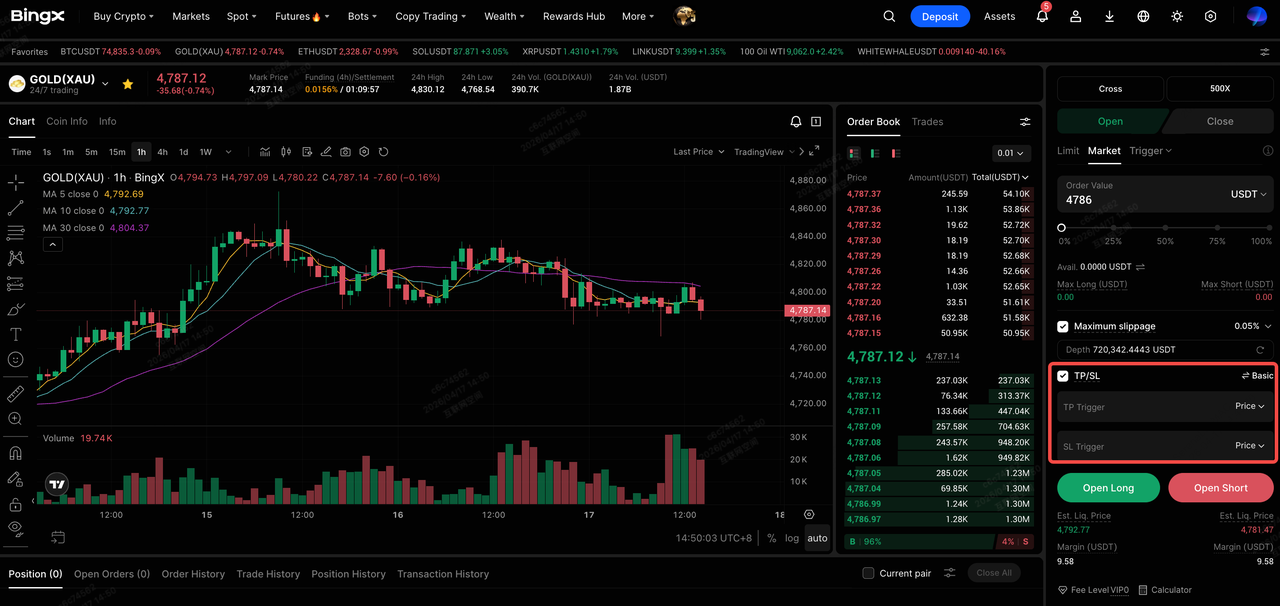
- Access Perpetual Futures: Navigate to the Perpetual Futures trading interface.
- Toggle TP/SL: In the order panel on the right, check the TP/SL box before opening your position.
- Choose Mode:
- Basic: Set your exit by a simple price or ROI percentage.
- Advanced: Define if the exit applies to the Entire Position or just the Current Order.
- Basic: Set your exit by a simple price or ROI percentage.
- Input Values: Enter your trigger prices or use the PnL/ROI % shortcuts, e.g., Set SL at -10% ROI.
- Execute: Click Buy/Long or Sell/Short. Your exits are now bracketed around your entry.
Setting TP/SL on the BingX App for Active Positions
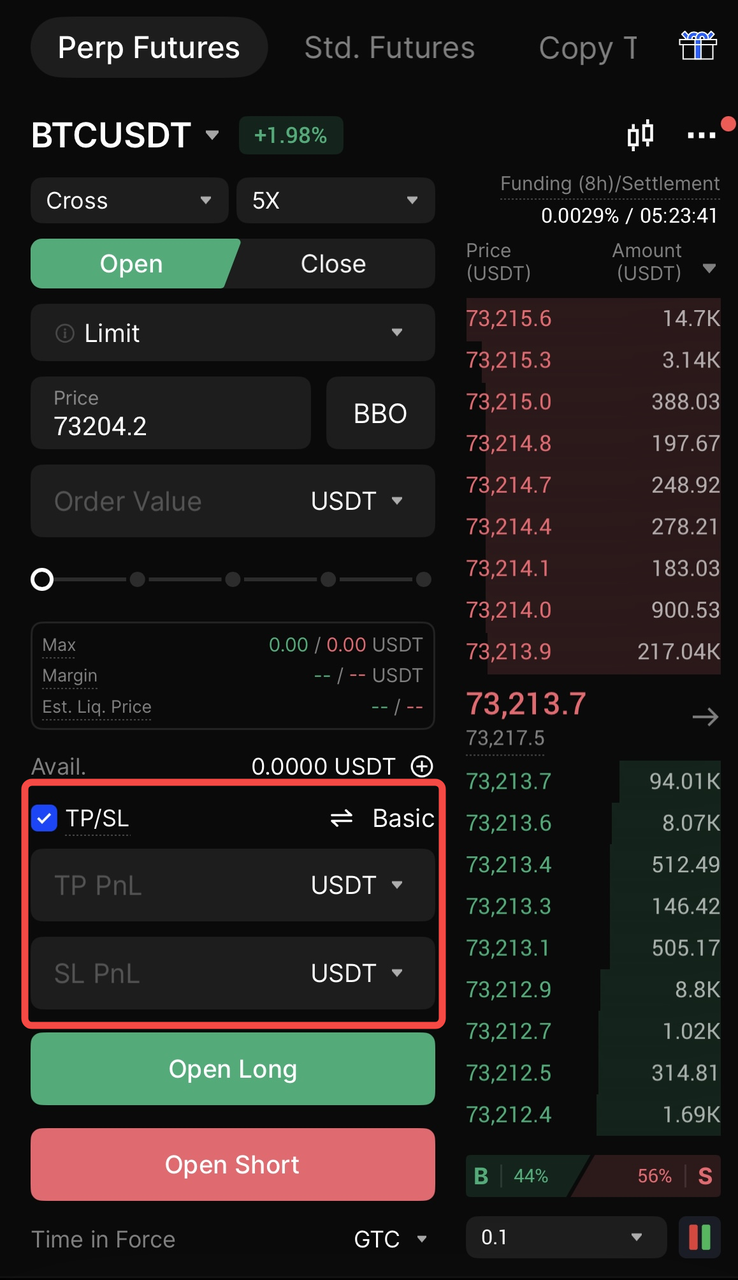
- Go to Positions: Tap the Futures tab and locate your active trade at the bottom.
- Tap TP/SL: Tap theAdd TP/SL button on the position card.
- Select Partial or Entire: Choose Entire Position for a simple exit or Partial to set multiple targets.
- Use the Slider: Quickly set targets using the 25%, 50%, or 75% buttons to define how much of the position to close.
- Confirm: Tap Confirm. You will now see your TP/SL lines directly on the candlestick chart.
Top 5 Tips for Managing Exits and Protecting Capital
Use these five professional strategies to navigate the BingX futures market safely:
- Avoid the Liquidation Zone: Never set your SL trigger price too close to your Liquidation Price. Because liquidations are prioritized by the system, a sudden move might trigger a forced liquidation before your SL can execute.
- Use Trailing Stops for Moonshots: If a trade is moving heavily in your favor, switch to a Trailing Stop. This allows the SL to follow the price upward, locking in profits while giving the trade room to breathe.
- Scale Out with Partial TP: Don't be an all-or-nothing trader. Use the Partial Position mode to take 25% profit at your first target. This de-risks the trade and ensures you walk away with a win even if the market later reverses.
- Mind the Order Type: Remember that Limit TP/SL orders require a matching buyer/seller at your specific price. For high-speed crashes, use Market TP/SL to ensure you get out of the market immediately.
- Sync Your Logic: In the 2026 Unified Model, if you manually reduce your position size, the system may automatically adjust your Entire Position TP/SL quantities to keep your risk-reward ratio consistent.
Final Thoughts: Why Use TP and SL Orders in the 2026 Futures Market
Automated exit strategies are the primary defense against the high-velocity volatility of the 2026 derivatives market. By utilizing BingX’s unified TP/SL toolkit, incorporating ROI-based triggers, partial position scaling, and slippage-free Guaranteed SL, traders can decouple their execution from emotional bias. When your exits are mathematically predefined, you ensure that scam wicks and sudden reversals result in calculated outcomes rather than catastrophic liquidations.
Success in futures trading is dictated by capital preservation over a long series of trades. Implementing a volatility-adjusted stop-loss and a multi-stage take-profit plan transforms a speculative position into a structured risk management operation. This systematic approach allows you to participate in high-reward opportunities with the precision of an institutional manager, ensuring that your trading balance remains resilient across diverse market cycles.
Risk Reminder: While TP/SL orders significantly mitigate downside risk, they do not eliminate it entirely. In environments of extreme market gaps, system maintenance, or insufficient order book liquidity, even automated orders may face execution delays or partial fills. Traders should regularly monitor their Open Orders tab and maintain sufficient margin buffers to account for unforeseen market anomalies.
Ready to secure your gains? Open a BingX account today and experience the most advanced TP/SL engine in the crypto industry.
Related Reading
- How to Get Started with Perpetual Futures Trading on BingX: A 2026 Beginner's Guide
- What Are the Different Order Types Supported on BingX Futures and How to Use Them?
- Cross Margin vs. Isolated Margin to Master Your Risk on BingX Futures: A 2026 Beginner's Guide
- 2026 Guide to Risk Management on BingX Futures: Protect Your Capital with Professional-Grade Tools
- How to Calculate Profit and Loss (PnL) on BingX Futures: A 2026 Guide to Futures Profitability
- How to Calculate Costs in Futures Trading: Decoding Opening Fees, Funding Rates, and Slippage on BingX
FAQs on TP/SL Orders in Futures Trading
1. Can I set both a TP and an SL at the same time?
Yes. BingX uses OCO (One Cancels the Other) logic. Once one is triggered, the other is automatically canceled to prevent an unintended new position from opening.
2. Does setting a TP/SL cost extra fees?
There is no activation fee for setting a TP/SL. You only pay standard trading fees once the order is triggered and executed. Guaranteed SL may involve a small premium for the slippage protection.
3. Why did my SL fail to trigger?
Exits can fail if the SL price is set too close to the liquidation price, or if you use a Limit Order and the market skips your limit price without finding a matching order.
4. Can I modify my TP/SL while a trade is open?
Absolutely. You can adjust your trigger prices at any time through the "Positions" tab on both the Web and App interfaces.
5. What is the difference between ROI and Price settings?
Setting by Price is a fixed target, e.g., $65,000. Setting by ROI calculates the target based on your percentage gain/loss,e.g., "Take profit at 50% ROI".
